SEO score and overview
How the SEO score is worked out, what Must fix means, and which fix to make next.
The SEO score is the share of your pages in search that have nothing that must be fixed. Two problems count towards it: a search title shared with another page, and a home page with no search description. The score tells you what RankX AI found on your pages and which fix to make next. It is not a forecast of rankings or traffic.
Before you start
- Every plan, including Free. The check, the score and the Overview cost nothing.
- Open SEO in the app menu. Overview is the first tab.
- Some fixes on this page use credits. The app shows the live price on each button.
What is on the SEO page?
The SEO page has six tabs. All of them read your store, and each one has its own guide.
| Tab | What it is for |
|---|---|
| Overview | The score, the next fix, and each area at a glance |
| Listings | Search titles and descriptions |
| Content | The content check and upgrades |
| Rich results | What Google can read, the Extra product info embed, llms.txt and agents.md |
| Links | Broken links and redirects |
| Your Search Console report |
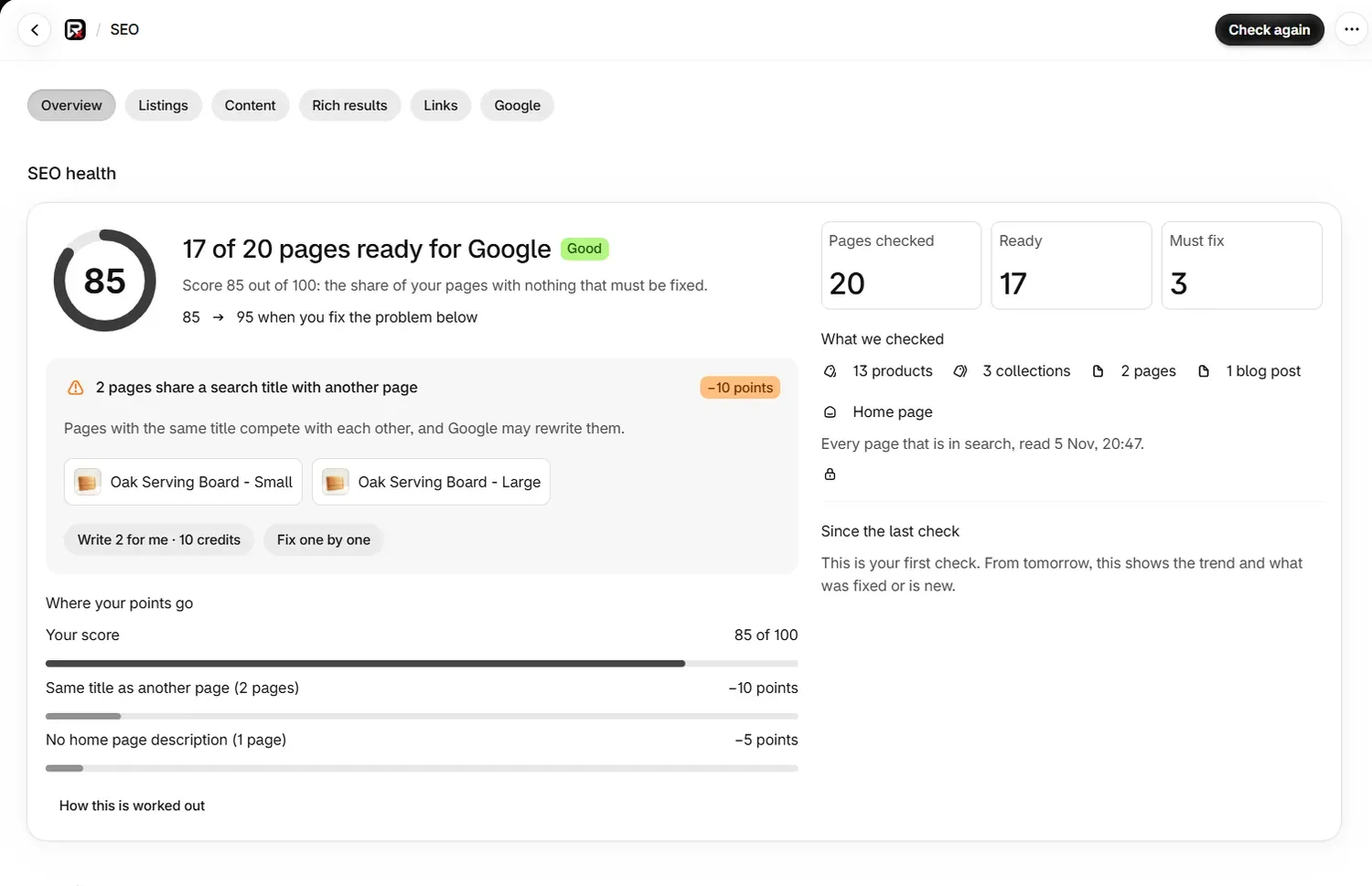
How is the SEO score worked out?
RankX AI takes the pages it checked, removes every page with at least one must-fix problem, divides by the pages checked, and rounds to a score out of 100. A store with 20 pages checked and 3 pages with a must-fix problem scores 85, because 17 of 20 pages are ready. The home page counts as a page.
Only two problems are Must fix:
| Problem | Label in the app | Where you fix it |
|---|---|---|
| A search title shared with another page | Same title as another page | Listings |
| A home page with no search description | No home page description | Online Store preferences in your Shopify admin |
Every other finding is marked Should fix or Nice to have. That includes a product, collection, page or blog post with no search description: it is a Should fix problem, so it leaves the score unchanged and still lowers the Search listings area score further down the page.
Where your points go lists each must-fix problem with the number of pages it affects and the points it costs. How this is worked out opens a short note about the score under that list.
What do the score bands mean?
| Score | Badge |
|---|---|
| 0 to 30 | Needs work |
| 31 to 70 | Fair |
| 71 to 90 | Good |
| 91 to 100 | Excellent |
At 100, the top card reads "Nothing must be fixed", and any remaining suggestions stay listed below it.
Which pages does the check count?
Pages checked covers what is in search:
- Products that are active and not known to be unpublished from the Online Store.
- Collections with products, apart from the built-in home page and all-products collections.
- Published pages, apart from utility pages such as contact, privacy, terms, cookie, legal, accessibility, refund and shipping policy pages.
- Published blog posts.
- The home page, when its description can be read.
On a large store, the check reads the first 2,000 of each kind of page and says so on the page.
How do I raise my SEO score?
Read the top card
The card under the score shows the must-fix problem that costs the most points, with up to three example pages and the score you would reach once it is fixed.
Make the fix
Select a button on the card. Write 2 for me · 10 credits writes new listings for you to review, and Fix one by one opens the pages so you can type your own, which is free. For the home page, select Open Online Store › Preferences, because the home page listing is set in Shopify.
Check again
Select Check again at the top of the page. The page updates by itself while the check runs.
What do the cards under "Then fix these" mean?
Then fix these shows up to five more problems, ranked by points, then severity, then how many pages are affected. The heading reads Fix these first when there is no top card.
| Label | Meaning |
|---|---|
| Must fix | Counts towards the score |
| Should fix | Worth doing soon; not part of the score |
| Nice to have | A smaller improvement |
| +5 points (or another number) | What the score gains when this is fixed |
| Under 1 point | Counts towards the score, by less than a point |
| Not in score | Helps shoppers and Google, and leaves the score unchanged |
Each card carries the button for its fix:
| Button | Where it takes you |
|---|---|
| Write 2 for me · 10 credits, Fix one by one | The pages with that listing problem |
| Fill from a template · free | Auto-fix templates, for missing titles or descriptions |
| Fix the links | The Links tab |
| Turn on the embed, See the product page check, See how to add them | The Rich results tab |
| Open Content | The Content tab |
| Fix alt text (free) | Alt text and image checks |
What do the areas measure?
Areas gives each part of your SEO its own score out of 100, separate from the main score. Open an area to see what it measures and fix it. An area that could not be read shows Not checked.
| Area | How it is scored |
|---|---|
| Search listings | Share of pages with no Must fix or Should fix listing problem |
| Content | Average content score of what is in search |
| Images | Share of products with no image problem |
| Links | Share of checked links that work |
| Rich results | Three equal checks: the embed is on, the product is described once, and shipping and returns are present |
| AI readiness | Share of content with no short-answer, question-heading or FAQ gap, with your agents file counted as a fifth of the area when its status is known |
When does the check run?
The stored check refreshes in three ways:
- Once a day on its own, whether or not you open the app.
- When you open the page and the stored check is more than 6 hours old.
- When you select Check again, up to once every 2 minutes.
Since the last check shows how the score moved and badges for what was fixed and what is new. The trend covers the last 30 checks and appears after a second daily check.
What else is on the Overview?
| Section | What it shows |
|---|---|
| Results from Google | Clicks from Google over 28 days once Search Console is connected. Each fixed page is compared before and after, from 14 days after its change. |
| Your recent fixes | Your latest three fixes with a badge: Confirmed on your store, Saved, Undone or Not saved. See every change and undo opens Changes. |
| What's already fine | What passed, with a count. |
Every change goes into Shopify's own fields, is checked on your store, can be undone from Changes, and stays if you uninstall.
Common problems
| What you see | Cause | What to do |
|---|---|---|
| Not yet: "Your store was checked a moment ago." | A check ran less than 2 minutes ago | Wait a couple of minutes, then select Check again |
| Your store could not be read | The first read of your store did not finish | Select Check again. RankX AI also tries again on its own |
| "Showing the check from" a date | The newest read did not finish, so the last good check stays on screen | Nothing. RankX AI tries again on its own |
| Not checked, because your store has a password | Google and RankX AI cannot read a password-protected storefront from outside | Remove the password in your Online Store preferences when the store is ready to open |
| The score went down after you added pages | New pages have a must-fix problem | Read the note under the score, which says how many more pages have a must-fix problem |
| The score went down after you removed pages | Fewer pages are in search, so each page left to fix counts for more | Fix the pages listed under Where your points go |
| You wrote search descriptions and the score stayed the same | A missing description on a listing is a Should fix problem | Look at the Search listings area, which has moved |
What to do next
- Edit your search titles and descriptions
- Find broken links and add redirects
- Connect Google Search Console
Questions
How is the SEO score worked out?
The score is the share of your pages in search with no must-fix problem. RankX AI takes the pages checked, removes those with at least one must-fix problem, divides by the pages checked and rounds to a score out of 100. The home page counts as a page.
Which problems lower the SEO score?
Two: a search title shared with another page, and a home page with no search description. Every other finding is marked Should fix or Nice to have and leaves the score as it is.
Does a missing search description on a product lower the score?
No. On a product, collection, page or blog post it is a Should fix problem, so it shows as Not in score. It does lower the separate Search listings area score, and it is still worth writing.
How often does the SEO check run?
Once a day on its own, whether or not you open the app. It also refreshes when you open the page and the stored check is more than 6 hours old, and when you select Check again.
Last updated