Search titles and descriptions
Edit how pages look in Google, what the limits are, and why the app does not change URLs.
The Listings tab is where you edit the search title and search description that Google may show for each product, collection, page and blog post. You can type your own for free, or have a listing written for you and approve it before anything changes. Every saved change is checked on your store and can be undone.
Before you start
- Typing your own listing and Fill in bulk: every plan, including Free.
- Write it for me: a paid plan or the trial. It costs 5 credits a page, and the app shows the live price on the button.
- Open SEO, then the Listings tab.
How do I find the pages that need work?
Search listings shows how each page may look in Google, 50 rows at a time, with its problems as coloured badges.
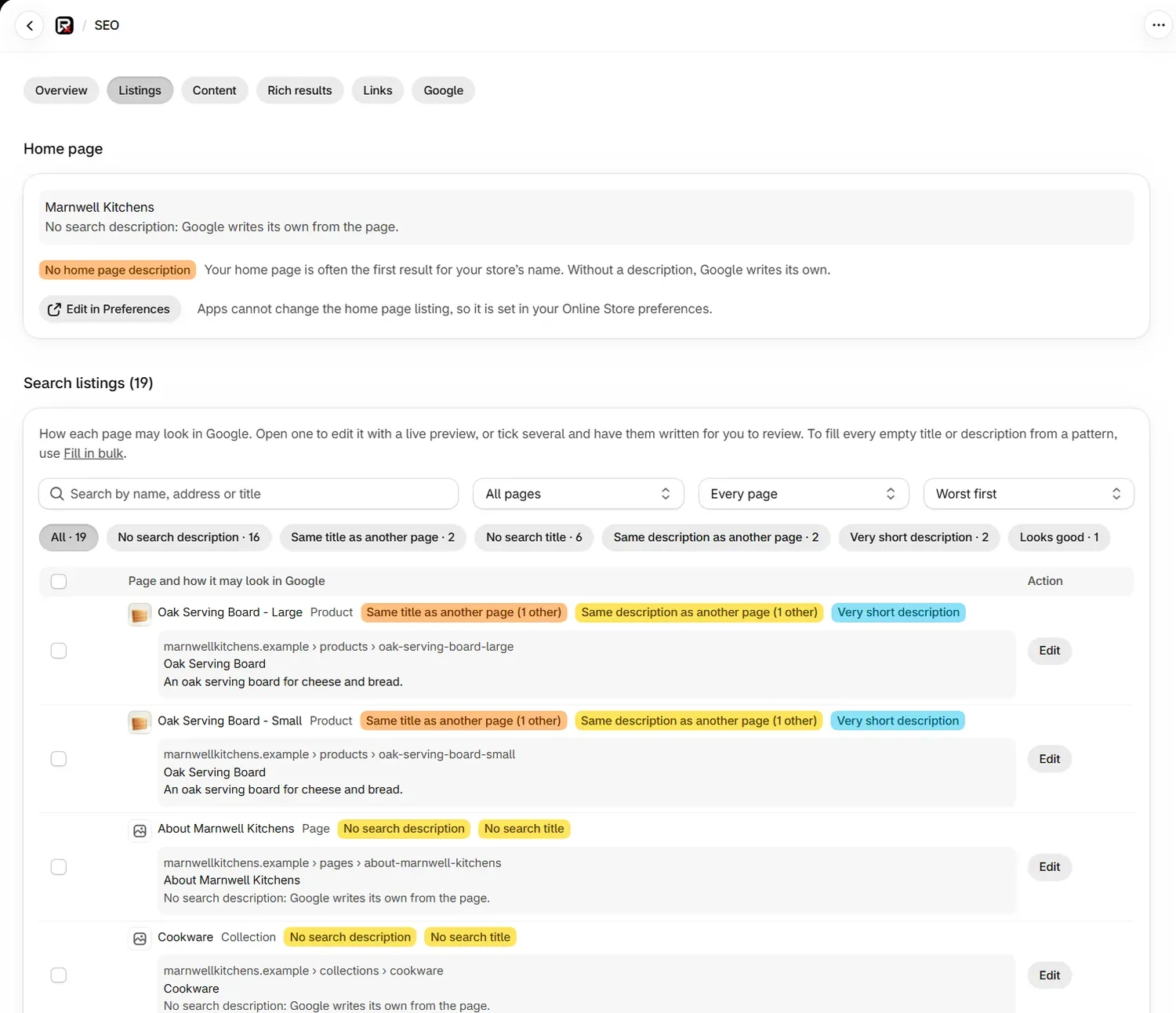
| Control | What it does |
|---|---|
| Search by name, address or title | Finds a page by any of the three |
| All pages | Narrows to Products, Collections, Pages or Blog posts |
| Every page | Narrows to Any problem, Looks good or one problem, with its count |
| Worst first | Sorts the list. Most clicks appears once Search Console is connected, and Name sorts by name |
| Chips such as No search title · 6 | Show one problem at a time |
How do I edit a search title or description?
Open the page
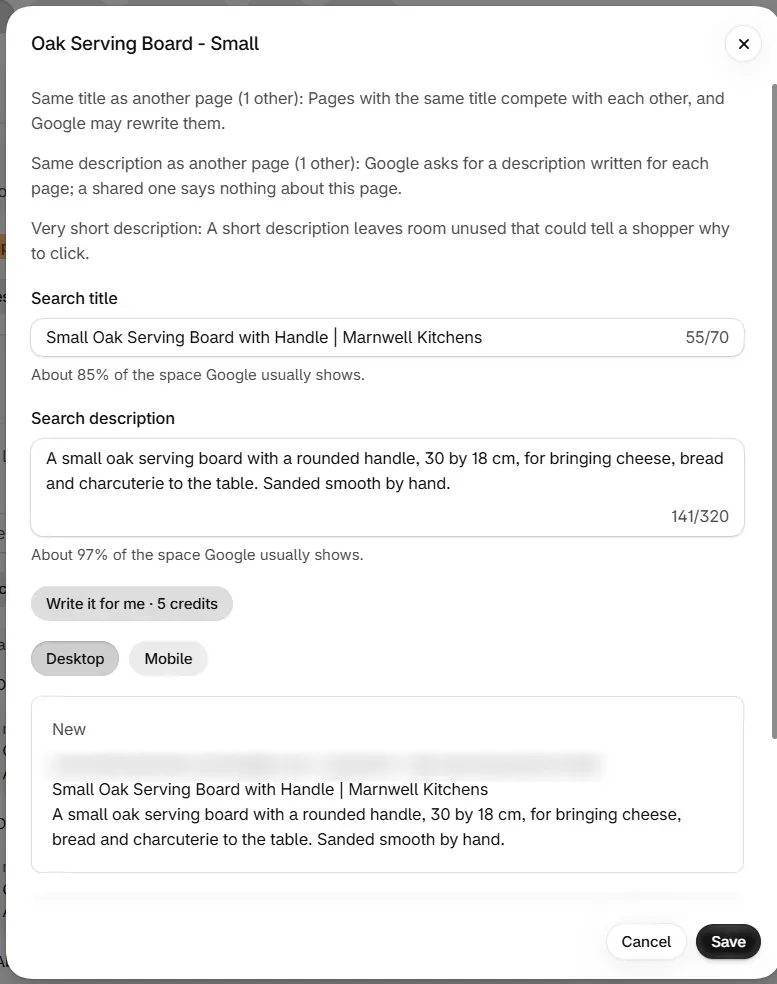
In Search listings, select Edit beside the page. The editor lists that page's problems and why each one matters.
Write the listing
Type in Search title and Search description, or select Write it for me · 5 credits. Written text fills the boxes and nothing is saved yet.
Check the preview
Switch between Desktop and Mobile. New shows your listing and Now shows the current one. Google may still show a different title or description.
| Status | Meaning |
|---|---|
| Saved and confirmed | The change was read back from your store |
| Saved, not yet confirmed | Shopify accepted the change and the read back is not finished |
How long can a search title or description be?
The preview measures the space a listing takes in pixels, because Google cuts by width. The hint under each box shows how much of that space you are using, such as "About 85% of the space Google usually shows." Past 100%, the end of the text may be cut off. An empty description means Google writes its own from the page.
| Limit | Search title | Search description |
|---|---|---|
| Most you can type in the box | 70 characters | 320 characters |
| Flagged as very short | Below 15 characters | Below 70 characters |
| Flagged as may be cut off | Above 60 characters | Above 158 characters |
| Written for you | 10 to 60 characters | 50 to 158 characters |
What does each listing problem mean?
Only Same title as another page counts towards the SEO score. The others help shoppers and Google.
| Badge | Severity | What it means |
|---|---|---|
| Same title as another page | Must fix | Pages with the same title compete with each other, and Google may rewrite them |
| No search description | Should fix | Your theme and Google write one from the page instead |
| No search title | Should fix | Shopify uses the page name instead |
| Same description as another page | Should fix | A shared description says nothing about this page |
| Mostly the same words as other titles | Nice to have | Three or more titles share words that make up at least 60% of the title, leaving out the page name and store name |
| Title is just the name | Nice to have | The search title only repeats the page name |
| Title may be cut off | Nice to have | The title is above 60 characters |
| Description may be cut off | Nice to have | The description is above 158 characters |
| Very short title | Nice to have | The title is below 15 characters |
| Very short description | Nice to have | The description is below 70 characters |
| Looks good | None | Nothing to change |
The duplicate checks compare what is shown, so two pages with no search title and the same page name count as the same title. A badge such as (1 other) says how many pages share it.
How do I change the home page listing?
The home page is set in Shopify, because apps cannot change it. In the Home page section, select Edit in Preferences to open your Online Store preferences, write the description there, and save. A home page with no description is a Must fix problem.
Can I change a product's URL in the app?
No. RankX AI does not change a URL handle. The Listings editor writes the search title and search description only, and has no URL field.
To change an address:
- Change the handle in Shopify, on the product's search engine listing.
- Open the old address. If it shows a page not found, add a redirect on the Links tab. If Shopify already made a redirect for the old address, you do not need another.
How do I write several listings at once?
Tick the pages
Tick the rows you want. A bar shows Write 2 for me with the total price, and Clear to start again. The first 50 pages are written in one go.
Wait for the writing
A progress line counts the pages. Nothing is saved until you approve.
Review
In Review written listings, each row shows the new listing and what it was. Edit any of them, and untick Keep for those you want to leave as they are.
Approve
Select Approve. Each listing is checked on your store. The result shows how many are confirmed, not yet confirmed or not changed, with Undo all to reverse the whole set. You can leave the page while the rest carries on.
To fill every empty field from a pattern for free, use Fill in bulk and see Auto-fix templates.
What happens to written listings I do not approve?
Written listings stay on hand for 14 days, and nothing changes on your store until you approve them.
Discard the drafts in the review panel closes the panel and keeps the drafts. They come back in the box that says "written listings are waiting for you". In that box, Review them reopens the review and Discard clears them.
The credits for a written listing are used when it is written, so discarding it does not return them.
How do I empty a search title or description?
Clear the field in Shopify, on the page's search engine listing. The Listings editor changes a field to new text, and it keeps a field left empty as it was. If you empty one box and change the other, the change saves and the emptied field keeps its value.
Common problems
| What you see | Cause | What to do |
|---|---|---|
| "We discarded that suggestion because" and a reason | The written text broke a length limit, matched the current text, or made a price, stock, delivery or guarantee claim the page does not make | Nothing was charged. Select Write it for me again, or type your own |
| "Writing stopped early, so only these are here." | Credits ran out, or your plan changed, during the run | Review what was written. Nothing was charged for the rest |
| A button is greyed out with a plan message | Write it for me needs a paid plan or the trial | Type your own for free, or choose a plan |
| "That product is not in search" | It is a draft, or not on your Online Store | See Search visibility and sales channels |
| A message that an empty field was not written | The box was emptied and nothing else changed | Clear the field in Shopify |
| "You have made a lot of changes in the last hour." | You passed 300 single changes in an hour | Wait a little, then carry on |
| "Your store is large" | The list covers the first 2,000 of each kind of page | Use Search by name, address or title and the filters |
What to do next
- Fill empty fields with auto-fix templates
- Learn how AI-written listings and alt text work
- Add a redirect
Questions
Can I change a product's URL in the RankX AI app?
No. The app edits the search title and search description, and never changes a URL handle. Change the handle in Shopify, then add a redirect in the Links tab if the old address now shows a page not found.
Is it free to edit a search title?
Yes. Typing your own title or description is free on every plan, including Free. Having one written for you costs 5 credits a page on a paid plan or the trial.
How do I get rid of written listings I do not want?
Written listings wait for 14 days. In the box that says written listings are waiting, select Discard to clear them. Nothing reaches your store unless you approve it.
How do I empty a search title or description?
Clear the field in Shopify, on the page's search engine listing. The Listings editor changes a field to new text and keeps a field that is left empty as it was.
Last updated