Undo changes
How Changes records every edit, how undo works and what happens if a product changed after a fix.
Changes lists everything RankX AI has changed on your store, with the earlier value beside each change, and it is where you undo a fix. Shopify keeps no revisions of these fields, so the app records the value before every write. If a field has changed since the fix, undo leaves it alone rather than overwriting your newer work.
Before you start
- Every plan, including Free. Changes and undo use no credits.
- Changes is under Settings.
- Undo has no time limit while the app is installed.
How do I undo a change?
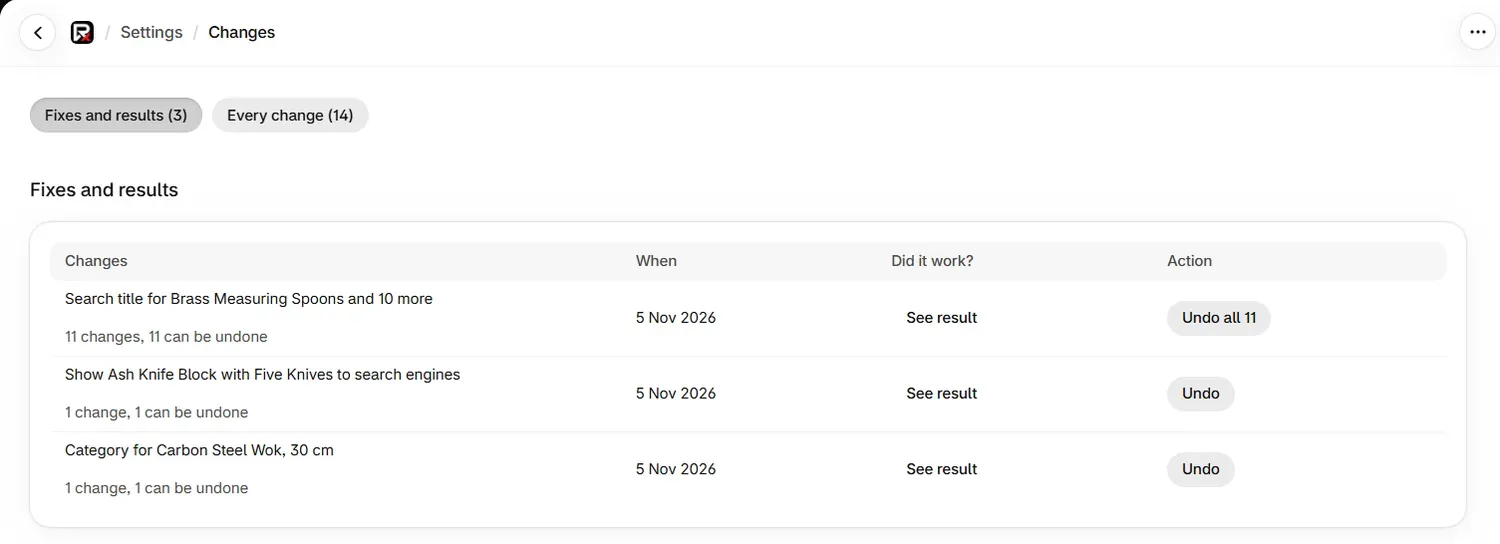
Find the fix
Fixes and results groups changes by fix. Every change lists each field on its own, with its value before and after.
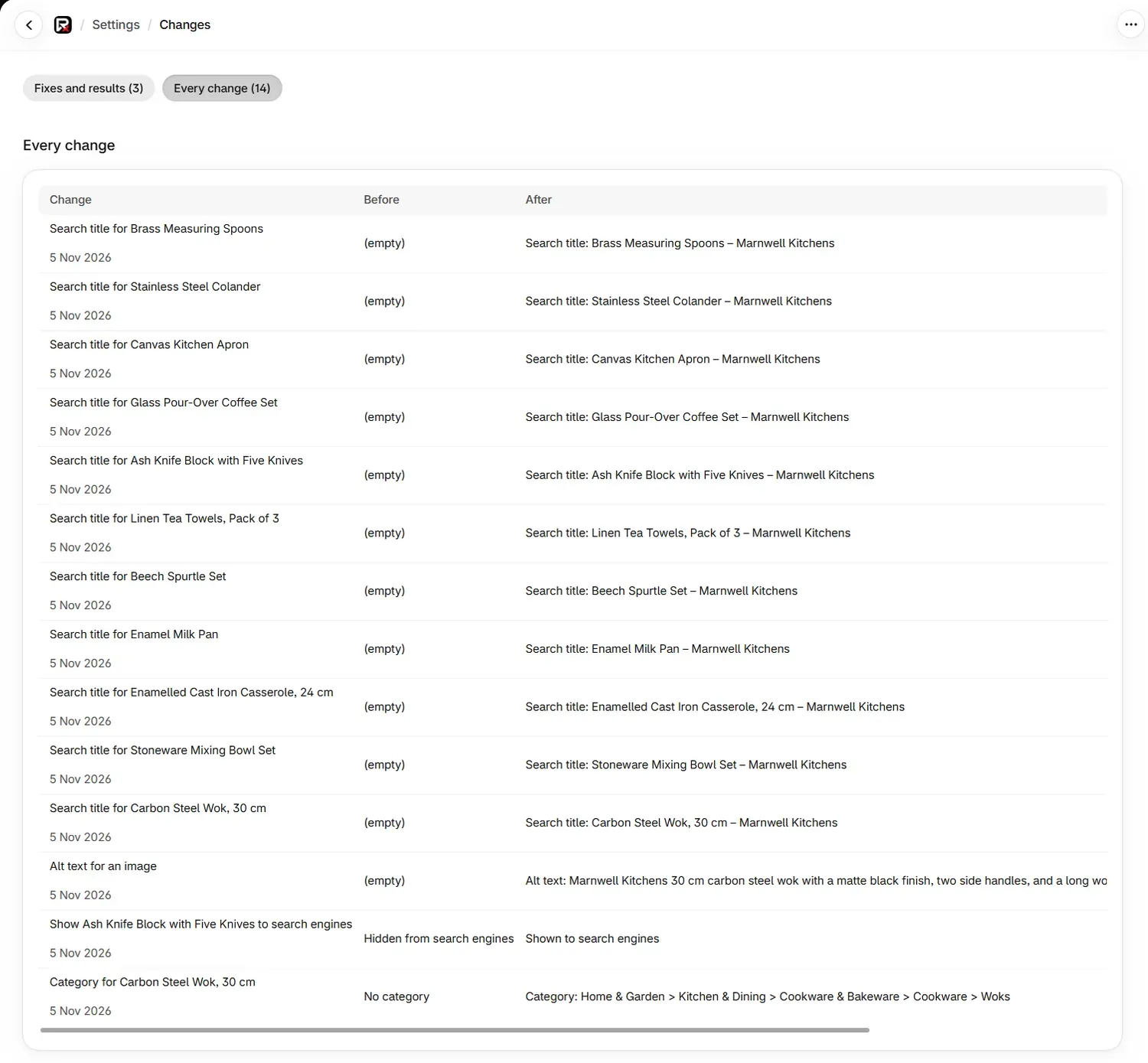
Select Undo
Select Undo beside a single change, or Undo all on a fix that covers several. A message confirms Change undone, and the status becomes Undone.
Straight after a fix, you can also select Undo on the row where you made it. On a product's page, the Changes card lists its last eight changes, and See all changes and undo opens this page.
What is on the Changes page?
| View | Columns | Use it for |
|---|---|---|
| Fixes and results | Changes, When, Did it work?, Action | Reversing a whole fix, and seeing whether it worked. |
| Every change | Change, Before, After, Status, Action | Seeing exactly what was written, field by field. |
The list loads 500 changes at a time, and Show earlier changes loads more, up to 5,000.
See result in the Did it work? column opens a free, read-only report. Did it work? explains how to read it.
What does each status mean?
| Status | What it means |
|---|---|
| Saved and confirmed | The change was written and read back from your store. |
| Saved, not confirmed | The change was sent, but your store did not read back the new value. |
| Not saved | The change did not reach your store. |
| Undone | The earlier value has been put back. |
| Undo did not complete | The undo did not finish. You can try it again. |
What happens if the product changed after the fix?
Undo compares the fields that fix wrote with what is on your store now. If one differs, because of an edit in Shopify or a newer fix in the app, undo stops and nothing is changed. You see:
"This has changed since our fix, in Shopify or by a newer fix here, so we left it as it is. If a newer fix changed it, undo that one first. Nothing was changed."
Other fields on the product play no part, so editing a price never blocks undoing a category. To reverse several fixes on one field, undo the newest first.
What does undo do for each kind of change?
| Change | What undo does |
|---|---|
| Category | Puts the earlier category back, or clears it if there was none. |
| Barcode | Puts the earlier barcode back, or clears it if there was none. |
| Search engine setting | Puts the earlier setting back, so a product you showed is hidden again. |
| Detail | Puts the earlier values back, or takes the value off the product. A value added to your store's list stays in that list. |
| Alt text | Puts the earlier alt text back. |
| Search title and description | Puts back the fields that fix changed, and only those. |
| Redirect | Deletes the redirect. It is refused if the redirect has been pointed somewhere else since. |
| Added image | Takes the image off the product. The file stays in Content › Files. It is refused if the product's images have changed since. |
| Published article | Not undone here. Open article takes you to it, and you manage it from Blog. |
A mark saying a product has no barcode is not a change to your store, so it is not listed here. Reverse it with Remove the mark in the barcode dialog.
What cannot be undone?
| Message | What it means |
|---|---|
| "This change did not reach your store, so there is nothing to undo." | The change was never written. |
| "This kind of change cannot be undone from the app." | Reverse it in Shopify. |
| "The previous text was longer than the change history keeps, so it cannot be put back in full. Nothing was changed." | The change history keeps a set length of text for each field, so a longer text is edited in Shopify. |
| "The change was made, but RankX AI could not record the previous version in its change history, so there is nothing stored to put back." | Shopify has no version history of its own, so there is no earlier value to use. |
| "The previous value was not recorded, so it cannot be put back." | No earlier value is stored for this field. |
Can I retry an undo that failed?
Yes. Select Undo again. What was already restored is not repeated, so a retry only touches what is left. On a fix that covers several products, the result says how many were put back. "There was nothing left to put back." means the earlier attempt finished the job.
Undo follows the same limits as fixes. One undo counts as a single change, within 300 an hour for each store. Undo all counts as a bulk fix, within 12 an hour.
Common problems
| What you see | Cause | What to do |
|---|---|---|
| "No changes yet" | The app has not changed anything on your store. | Make a fix from Go to Products. |
| "This has changed since our fix" | The field no longer holds what the fix wrote. | If a newer fix changed it, undo that one first. If you changed it in Shopify, edit it there. |
| "The undo could not be confirmed on your store." | The undo was sent, but the earlier value could not be read back. | Check the product in Shopify, then try again if needed. |
| "The product's images were changed in Shopify after this image was added" | Undo leaves the images as they are. | Remove the image in Shopify if you no longer want it. |
| "We could not read the change history just now." | The record could not be read. Nothing was changed. | Try again in a moment. |
| "We could not read your changes just now." | The page could not load. | Reload the page. |
What to do next
Questions
Where do I undo a change?
Go to Settings, then Changes, and select Undo beside the change. A fix can also be undone from its row on the issue page straight after you make it.
Is there a time limit on undo?
No. A change stays in Changes, and you can undo it for as long as the app is installed, unless the field has changed since.
What happens if I edited the product after the fix?
The app leaves it as it is. Undo compares the fields the fix wrote, and if one is different it refuses and nothing is changed. Your later edit is safe.
Does Shopify keep its own history of these changes?
No. Shopify keeps no revisions for these fields, so the record in Changes is what makes undo possible.
Last updated