AI-written listings and alt text
Generate, review and save AI search titles, descriptions, listing copy and alt text.
RankX AI has four tools that write text for your store, and you review each one before anything is saved. They cover alt text, search titles and descriptions, a listing aimed at one shopper question, and a full content upgrade. Typing your own text instead is free on every plan.
Before you start
- A paid plan or the trial. On the Free plan the buttons are disabled and the app says which plan includes them.
- Enough credits for the tool you pick. The app shows the live price on each button.
- Typing your own alt text or search fields needs no plan and no credits.
Which writing tool should I use?
| Tool | Where it is | What it writes | Credits |
|---|---|---|---|
| Write with AI | A product image with an alt text issue | Alt text, from the picture | 1 |
| Write it for me | SEO, then Listings | Search title and search description | 5 a page |
| Write a better listing | A shopper question's page | Search title, search description and description for one product, aimed at that question | 5 |
| Write upgrade | SEO, then Content | A fuller rewrite of a blog post, page, product or collection | 60 for a blog post or page, 5 for a product or collection |
You are charged only when a usable result comes back. Nothing is charged if the page cannot be read, the writing fails, or the result is thrown away by the rules below.
How do I write alt text with AI?
Open the image
On a product's page, go to Media. Open an image with an alt text issue.
Write the text
Select Write with AI · 1 credit to fill the Alt text box from the picture, or type your own.
Save it
Read the text, change it if you like, then select Save alt text. Each save is checked on your store and has an Undo button.
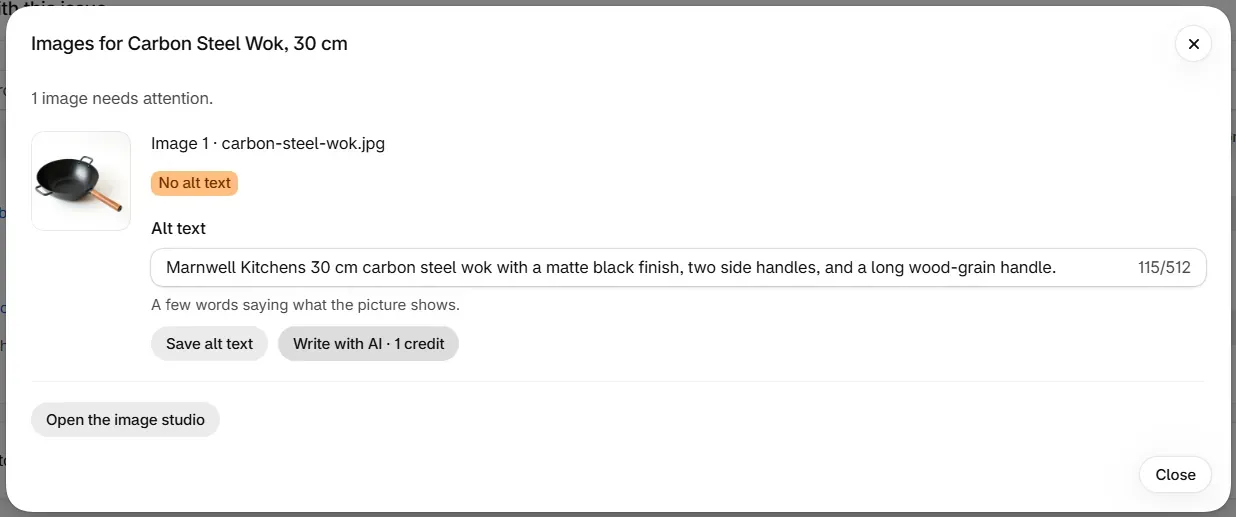
Written alt text is up to 160 characters. It says what the picture shows, and leaves out prices, stock, delivery and ranking claims. See Alt text and image checks for what each image finding means.
How do I have search titles and descriptions written?
For one page, open it in Listings, select Write it for me · 5 credits, read the text in the boxes, then select Save. For several pages, tick the rows and select Write 2 for me, then review and approve them. The first 50 are written in one go.
Written titles are 10 to 60 characters and descriptions 50 to 158, in your store's language. Written listings you have not approved wait for 14 days. Search titles and descriptions has the full steps, including how to clear drafts you do not want.
How do I write a better listing for a shopper question?
Write a better listing rewrites one product's search title, search description and description so it speaks to a question buyers ask, using only what its listing already says. The product title stays as it is.
Open the question
Go to AI search, open a question that has been checked, and find Improve a listing for this question.
Choose the product
Pick a Product from your monitored products, then select Write a better listing · 5 credits.
Check the preview
Read the Preview. Nothing has been saved yet.
Save it
Select Save to my store. The status shows Saved and confirmed or Saved, not yet confirmed, with Undo beside it.

The rewrite is based on what the AI assistants answered, so the question needs at least one check first. If no product is listed, monitor a product.
What about a full rewrite?
A content upgrade goes further than a listing. It rewrites a whole blog post, page, product description or collection description to close the gaps the check found. See Content check and upgrades.
What will the writing tools leave out?
Each result is checked before you see it, and one that breaks a rule is discarded with no charge.
| Tool | A result is discarded when it |
|---|---|
| Search titles and descriptions | Breaks the length limits, matches what the page already has, or makes a price, discount, stock, urgency, delivery, returns or guarantee claim the page does not make |
| Alt text | States a price, or a stock, delivery or ranking claim; starts with "image of"; repeats the file name; or matches the current alt text |
| Upgrades | Comes back in a shape that cannot be used. Figures that are not in your text are named in Check before applying |
How do I undo written text?
Everything you save goes into Shopify's own fields and can be undone. Use Undo on the row straight after saving, or open Changes.
Common problems
| What you see | Cause | What to do |
|---|---|---|
| "We discarded that suggestion because" and a reason | The result broke one of the rules above | Nothing was charged. Try again, or type your own |
| "You're on the Free plan. This is included in every paid plan." | The tool needs a paid plan | Choose a plan |
| "This needs 5 credits and you have 2." (or other numbers) | Your balance is short | Your next credits arrive with your plan. See Credits |
| "That took too long. Nothing was charged. Try again." | The writing did not finish in time | Select the button again |
| "We could not read that page from your store." | The store did not answer | Nothing was charged. Try again |
| "We could not download that image to look at it." | The image could not be fetched | Nothing was charged. Try again |
| "Available once this question has been checked" | The question has no check yet | Wait for its next scheduled check, or press Check now |
| "Monitor a product first." | No product is monitored | Add a monitored product |
What to do next
Questions
Does RankX AI change my product titles?
No. The writing tools work on search titles, search descriptions, product descriptions and alt text. The product title stays as you set it.
Does anything change on my store before I approve it?
No. Every tool shows you the text first. Nothing reaches your store until you save, approve or apply it, and saved changes can be undone.
Am I charged if a suggestion is thrown away?
No. If a suggestion breaks a rule, RankX AI discards it and nothing is charged. You can try again.
Can I write my own text instead?
Yes. Typing your own alt text, search title or search description is free on every plan, including Free.
Last updated