Google AI Mode markets
Where Google AI Mode showed products in our tests, and how to choose your market and switch it on or off.
Google AI Mode shows shopping results in some markets and for some questions, and RankX AI lets you decide whether to check it. AI Mode shopping results only appear where Google shows them. In markets where it rarely shows products, you can switch it off and spend those credits elsewhere.
Before you start
- Plan: every plan can open Settings. The checks themselves run on Starter, Growth, Pro and the free trial, and in the free check on Free.
- Market: your country is set from your Shopify billing country at install, when it is one the app offers. You can change it.
Where did Google AI Mode show products?
These are the results of our own tests of 5 shopping questions per market, run on 4 October 2026.
| Market | Questions where Google AI Mode showed products | At setup |
|---|---|---|
| Canada | 5 of 5 | On |
| United States | 4 of 5 | On |
| United Kingdom | 4 of 5 | On |
| Australia | 3 of 5 | On |
| Germany | 0 of 5 | Off |
| France | 0 of 5 | Off |
| Netherlands | 0 of 5 | Off |
Five questions is a small sample taken on one day. Results vary by question, by category and over time, and Google can change where it shows products. In the same tests, ChatGPT showed products for 4 or 5 of the 5 questions in every market.
Markets not in the table have not been measured, and Google AI Mode starts on for them. Your own checks are the better guide, because they use your questions.
What happens at setup?
Setup looks at your market once. Google AI Mode starts off in Germany, France and the Netherlands, and starts on everywhere else. Changing your market later does not change that choice, so look at the box yourself if you move to a different market.
How do I switch Google AI Mode on or off?
Open Settings
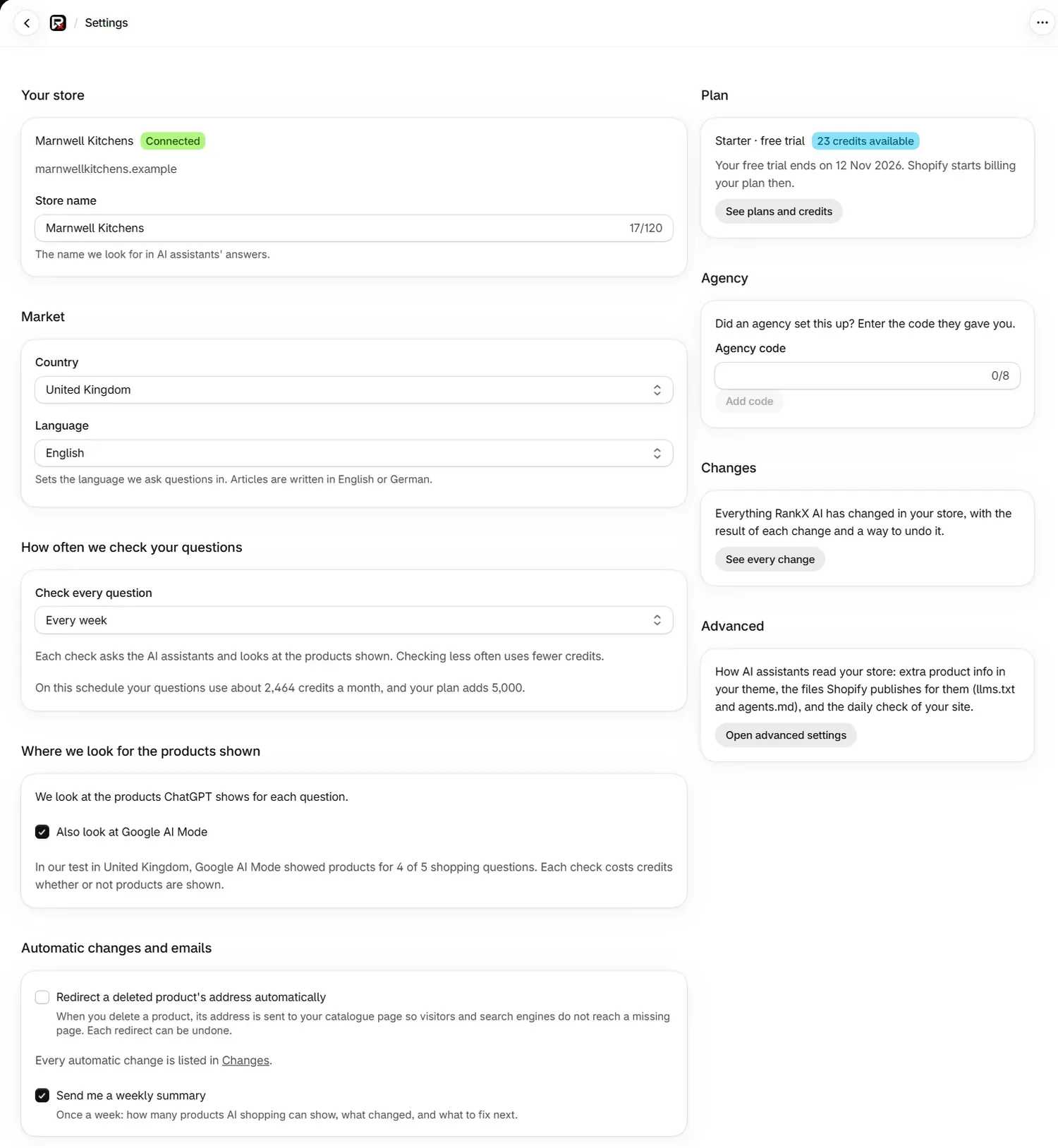
Go to Settings and find Where we look for the products shown.
Tick or untick the box
Use Also look at Google AI Mode. The change saves at once, and you will see "Google AI Mode switched on" or "Google AI Mode switched off".
Check your forecast
Look at the forecast under How often we check your questions, which updates with your choice.
ChatGPT Shopping stays on whatever you choose, so your questions always have somewhere to be checked.
The note under the box gives the test result for your market, such as "In our test in United Kingdom, Google AI Mode showed products for 4 of 5 shopping questions. Each check costs credits whether or not products are shown." For a market with no test result, it says that has not been measured yet.
What does Google AI Mode cost?
A check costs credits whether or not products show, because the question is still asked and the answer read.
| Setting | Each check of a question |
|---|---|
| Google AI Mode on | 25 credits (3 AI assistants and 2 shopping results) |
| Google AI Mode off | 20 credits (3 AI assistants and 1 shopping result) |
The app shows the live price above your questions. See ChatGPT and Google AI Mode checks for the full picture.
How do I choose my market?
Open Market
Go to Settings and find Market.
Pick a country
In Country, choose the country whose shoppers you sell to. The list has about 55 countries.
Pick a language
Language sets the language questions are asked in. Leave it on The country's main language unless your shoppers use another. You will see "Settings saved".
If you have not chosen a market, checks run for the United States in English, and the app asks you to choose the country whose shoppers you sell to.
What will I see in a market where AI Mode shows nothing?
Your checks still run, and the results say so plainly. The Products badge reads None shown, the summary reads "No products shown in 12 checks", and the history reads No products shown. Each is a true result for that check, and it says nothing wrong about your store.
Should I keep Google AI Mode on?
- Keep it on if your market shows products, or if you want to watch for Google starting to show them.
- Switch it off if several weeks of your own checks show None shown on Google AI Mode and you would rather use the credits on more questions.
You can change it at any time, and your past results stay on each question's page.
Common problems
| What you see | Cause | Fix |
|---|---|---|
| "At least one place must stay switched on, so ChatGPT is still checked." | ChatGPT Shopping cannot be switched off | Nothing to do |
| "Whether Google AI Mode is checked could not be read just now." | The setting did not load | Reload the page |
| "Choose a country from the list." | The country was not one of the list's entries | Pick one from the list |
| "We could not save your market just now." | The save failed | Try again |
| The box is unticked in Germany, France or the Netherlands | Setup starts it off there | Tick it if you want to check Google AI Mode |
What to do next
Questions
Does Google AI Mode show products in my country?
It depends on the market and the question. In our tests of 5 questions from 4 October 2026 it showed products most often in Canada, the United States, the United Kingdom and Australia, and for none of the 5 in Germany, France and the Netherlands. Results vary.
Do I pay for a Google AI Mode check if no products show?
Yes. A check costs credits whether or not products are shown. Switching Google AI Mode off lowers a check of a question from 25 credits to 20.
Can I switch off ChatGPT Shopping as well?
No. ChatGPT Shopping stays on, so at least one place is always checked. Google AI Mode is the one you can switch on or off.
Does changing my market switch Google AI Mode on or off?
No. The starting choice is made once, at setup. After that the Also look at Google AI Mode box stays as you left it, whichever market you choose.
Last updated