Read your results
Which stores and products AI answers show, what each status means and why rates need 10 checks.
Your results show what AI assistants said for each shopper question, which products were shown, and which stores were selling them. Each check is one snapshot, and the same question can show different products the next night. Read a single result as what happened that time, and rely on rates once a question has at least 10 checks.
Before you start
- Plan: results come from checks, which run on Starter, Growth, Pro and the free trial. Free stores see results from the free check, every 4 weeks.
- Timing: the badges beside a question update as each check finishes. Results are counted in overnight totals, so the summary and the Competitors tab fill in after the first night.
What does the summary at the top show?
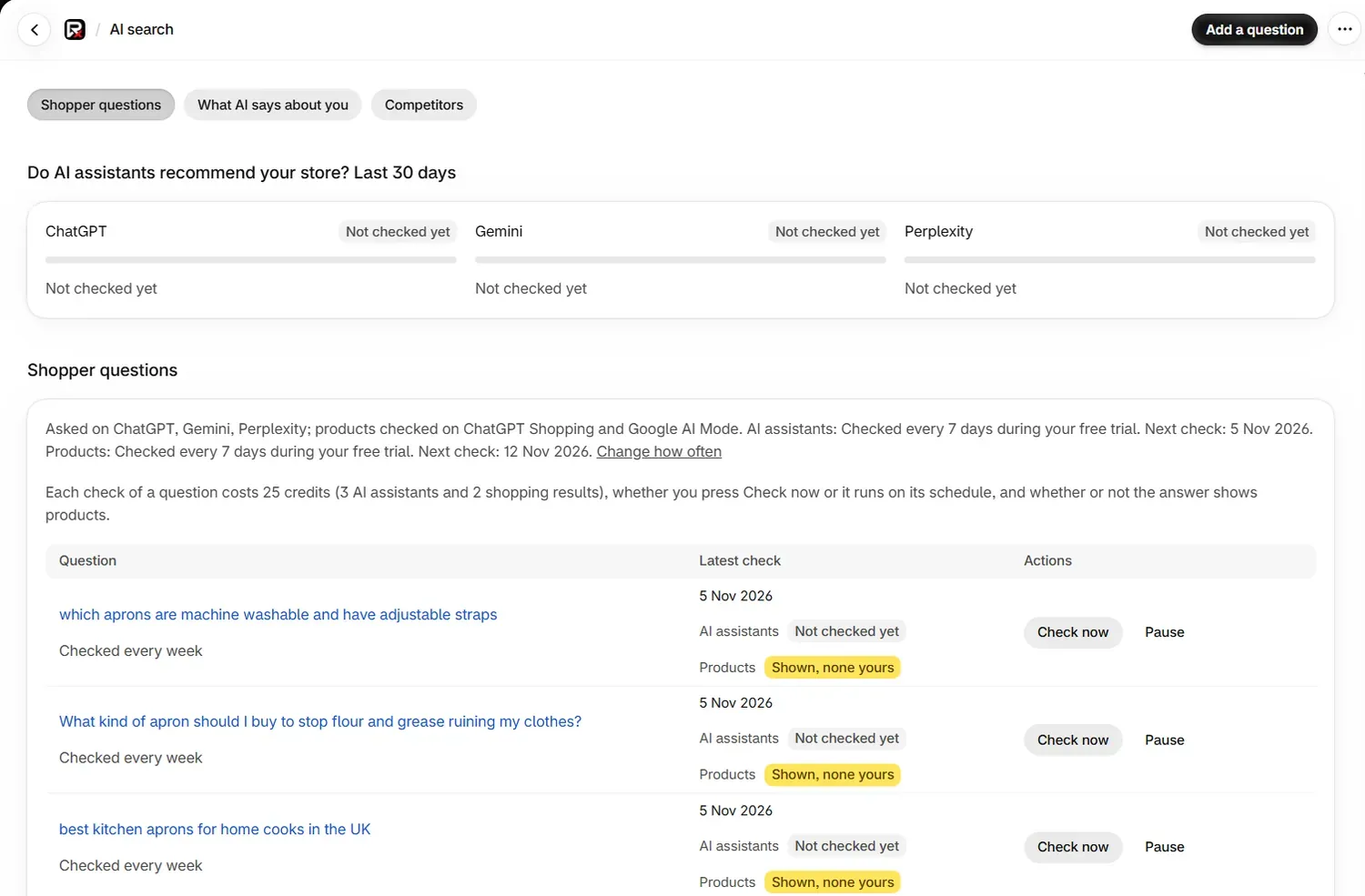
The section Do AI assistants recommend your store? Last 30 days has one panel for each place checked.
| Panel | Line you will see | What it means |
|---|---|---|
| AI assistant | "Named you in 6 of 40 answers" | Over the last 30 days, this many answers named your store |
| AI assistant | "(too few to read much into)" | There are too few answers to read much into the figure yet |
| ChatGPT Shopping or Google AI Mode | "The products you sell were in 3 of 20 answers that showed products, from any store" | Over the last 28 days, cards matched your monitored products, whichever store was selling them |
| ChatGPT Shopping or Google AI Mode | "No products shown in 12 checks" | Those checks ran and showed no products |
| Any | Not checked yet | No results have been counted for this place |
Failed checks are left out of every percentage.
What does each badge mean?
The Latest check column has one badge for AI assistants and one for Products.
| Badge | Meaning |
|---|---|
| Named by ChatGPT and Gemini | Those assistants named your store in their answer |
| Not named (3 answers) | The assistants answered and did not name your store |
| Yours shown on ChatGPT Shopping | A product card there had your store as the seller |
| Shown, none yours | Products were shown, and no card had your store as the seller |
| None shown | The answer showed no products |
| Checking… | The check is still running |
| Couldn't check · not charged | The check failed and no credits were used |
| Not checked yet | The question has not been checked |
On a question's page, each assistant has its own status.
| Status | Meaning |
|---|---|
| Named you | The answer named your store |
| Didn't name you | The answer did not name your store |
| Couldn't read the answer | An answer came back, and a verdict could not be reached from it |
| Not asked this time | That assistant was not part of this check |
What is the difference between "Your product appeared" and "Yours shown on"?
The two phrases answer different questions, and they can disagree about the same answer.
| Wording | Where | What it means |
|---|---|---|
| Yours shown on | Badge in the Shopper questions list | Your store was the seller on a card |
| Your product appeared | Product check history on a question's page | A card matched one of your monitored products. Another store may be the one selling it |
The Products badge is about who sold the product, and the history is about which product it was. If you stock a brand that other stores also sell, a card from another store can match your monitored product. The history then says Your product appeared while the list says Shown, none yours.
The summary line uses the same idea, which is why it ends with "from any store".
What is on a question's page?
Select a question to open its page. Sections appear once there is something to show.
| Section | What it tells you |
|---|---|
| What AI assistants said | Each assistant's answer, grouped by day |
| Products shown in AI shopping | How many answers showed products |
| Stores shown on ChatGPT Shopping and Stores shown on Google AI Mode | Each store's rate, with your own row marked You |
| Stores shown so far | Every store seen, before there are enough checks for rates |
| What the products that appeared have in common | Details the products shown state in their titles and yours do not |
| Why Google AI Mode showed these products | The reasons it gave in its own words |
| Prices in these answers | The price range of the other stores shown |
| What these answers compared on | The details the answers weighed up |
| Improve a listing for this question | A rewrite of one product's listing for this question |
| Product check history | Each product check and its result |
| Question type | Stage and topic, which you can edit |
The stores, prices and compared details are explained on Competitor stores.
Why do rates need 10 checks?
An AI answer can change from one night to the next. A store seen in 1 of 2 checks tells you very little, so the app waits for 10 checks of a question before it shows a rate. Until then you will see "Not enough checks yet for a rate: 4 of the 10 needed."
From 10 checks, the line reads like "Shows products in 14 of 20 answers (70%, likely 48% to 85%)." The likely range is where the true rate probably sits. It narrows as more checks come in.
A question that shows products on under 10% of checks is left out of share, and the page suggests replacing it. Sponsored cards are not counted.
Google AI Mode shows which store an offer comes from, and not which of your products it is. Results for your individual products are on the ChatGPT Shopping card.
How do I read Product check history?

| Result | Meaning |
|---|---|
| Your product appeared | A card matched a monitored product. Another store may be selling it |
| Other products, not yours | Products were shown, and none matched a monitored product |
| No products shown | The answer showed no products |
| Could not be read | The result could not be read, so it counts for nothing either way |
The history covers the last 28 days, up to 30 rows. A line such as "Out of stock that night (as of 4 Nov 2026)" names any monitored product that was out of stock.
What does "Why not mine?" do?
Why not mine? · 5 credits checks the same search on Google Shopping to find the likely reason your products were not in an answer. It appears on the 10 newest checks that read Other products, not yours, and takes about a minute.
| Result | What it means |
|---|---|
| "Your products are not in Google's shopping results for this search at all" | None of your products were found in the top results it checked |
| "Your products ARE in Google's shopping results for this search" | They were there, with the best position stated, and the assistant chose another product |
| "We could not compare this reliably, so we are not going to guess." | No conclusion was reached |
Below the result, What the other listings on that page had compares reviews, free delivery, sale prices and your listing side by side. It shows what shoppers saw there, and it does not prove why a listing was shown.
This check covers the United States, the United Kingdom, Canada, Australia, Ireland, Germany, France, Spain, Italy and the Netherlands. For any other market it uses the United States.
How do I read what AI assistants said?
Use the filters to choose Last 7 days, Last 14 days, Last 30 days or Choose dates (up to 30 days), and All assistants or one assistant. Answers are grouped by day, 12 to a page, with Newer and Older to move through them.
Select Read the answer to see the full text, with these parts:
- Brands named: who the answer named, marked "Your store was named" when you are one of them.
- Sources it cited: the pages it listed as sources.
- Pages it searched: what its search returned, cited or not.
- Searches it ran: the searches behind the answer.
The words of each answer are kept for 90 days. After that, who it named and the sites it used stay on the page.
Searches AI assistants ran lists what the assistants searched the web for before answering, for assistants that report it. Select Write a post to open the blog writer with that topic.
What does "What the answers show" mean?
This section picks out up to 5 findings across your questions.
| Finding | What to do |
|---|---|
| "Your questions are not triggering shopping results" | Use category and product questions. Brand questions almost never bring up products |
| "Your products are absent from every carousel we saw" | Check the question's stores and compared details, then run the product check |
| A named product "was out of stock on nights it did not appear" | Check its stock in your Shopify admin |
| A named product "is priced 12% above what the answer showed" | Compare the price shown with yours. This appears at 10% or more |
| A named product "is recommended, from another merchant's shelf" | No card named your store, so another listing is taking that demand. Review your own listing for the product |
| A named product "appears but never first" | Compare it with the listings above it |
| "No products to look for" | Choose monitored products |
| "No shopper questions are being checked" | Resume or add a question |
How do I improve a listing for a question?

Choose a product
On the question's page, go to Improve a listing for this question and pick a monitored product in Product. Products are tagged "shown in answers to this question" or "matches this question".
Write the listing
Select Write a better listing · 5 credits. The price on the button is always the live one.
Review and save
Read the Preview, then select Save to my store. The badge Saved and confirmed means the change was read back from your store. Select Undo to put it back.
The rewrite covers the product's search title, search description and description, and uses only what its listing already says. The product title is never changed. A field is left out, with a reason, if it repeats the listing, states something the listing does not say, or names another brand. The question must have been checked first. See AI-written listings and alt text.
Common problems
| What you see | Cause | Fix |
|---|---|---|
| The summary says Not checked yet but a question has badges | Overnight totals have not run yet | Look again tomorrow |
| Some rows use 30 days and others 28 | The answers rows cover 30 days and the shopping rows 28 | Read each row against its own period |
| None shown on every Google AI Mode check | Google did not show products for those questions in your market | See Google AI Mode markets |
| "Some answers are still arriving." | Assistants answer at different speeds | The rest appear when they finish |
| "This assistant could not be reached on this day. It was not charged." | That assistant failed for that check | It is asked again on the next check |
| "We keep the words of each answer for 90 days" | The answer is older than 90 days | Who it named and its sites stay visible |
| "That answer showed no product carousel, so there is no absence to explain." | Why not mine? needs an answer that showed products | Pick a check that shows other products |
What to do next
- See which stores win your questions
- Compare your prices on monitored products
- Find out whether a fix made a difference
Questions
What is the difference between Your product appeared and Yours shown on?
Your product appeared means a card in the answer matched one of your monitored products, and another store may be the one selling it. Yours shown on means your store was the seller on a card.
Why does my summary still say Not checked yet after a check?
Results are counted in overnight totals, so the summary and the Competitors tab fill in after the first night. The badges beside each question update as soon as a check finishes.
Why is there no rate for a store yet?
A rate appears from 10 checks of a question. One check can show different products from the next, so a rate from fewer checks would say more than the results support.
How long are AI answers kept?
The words of each answer are kept for 90 days. After that, who the answer named and the sites it used stay on the page.
Last updated