Content check and upgrades
Score articles, pages, products and collections for search and AI answers, and write upgrades.
The content check scores your blog posts, pages, products and collections against what Google and AI assistants look for, and names each gap. It is free on every plan. When you want a gap closed for you, an upgrade rewrites one item from its own facts and yours, and nothing reaches your store until you approve it.
Before you start
- The content check: every plan, including Free.
- Upgrades: a paid plan or the trial. An upgrade costs 60 credits for a blog post or page and 5 credits for a product or collection. The app shows the live price on each button.
- Open SEO, then the Content tab.
How is a content score worked out?
Every item starts at 100. A high impact gap takes off 20 points, a medium one 10 and a low one 5, down to 0. Scores of 90 or more show in green, 70 to 89 in yellow, and under 70 in orange.
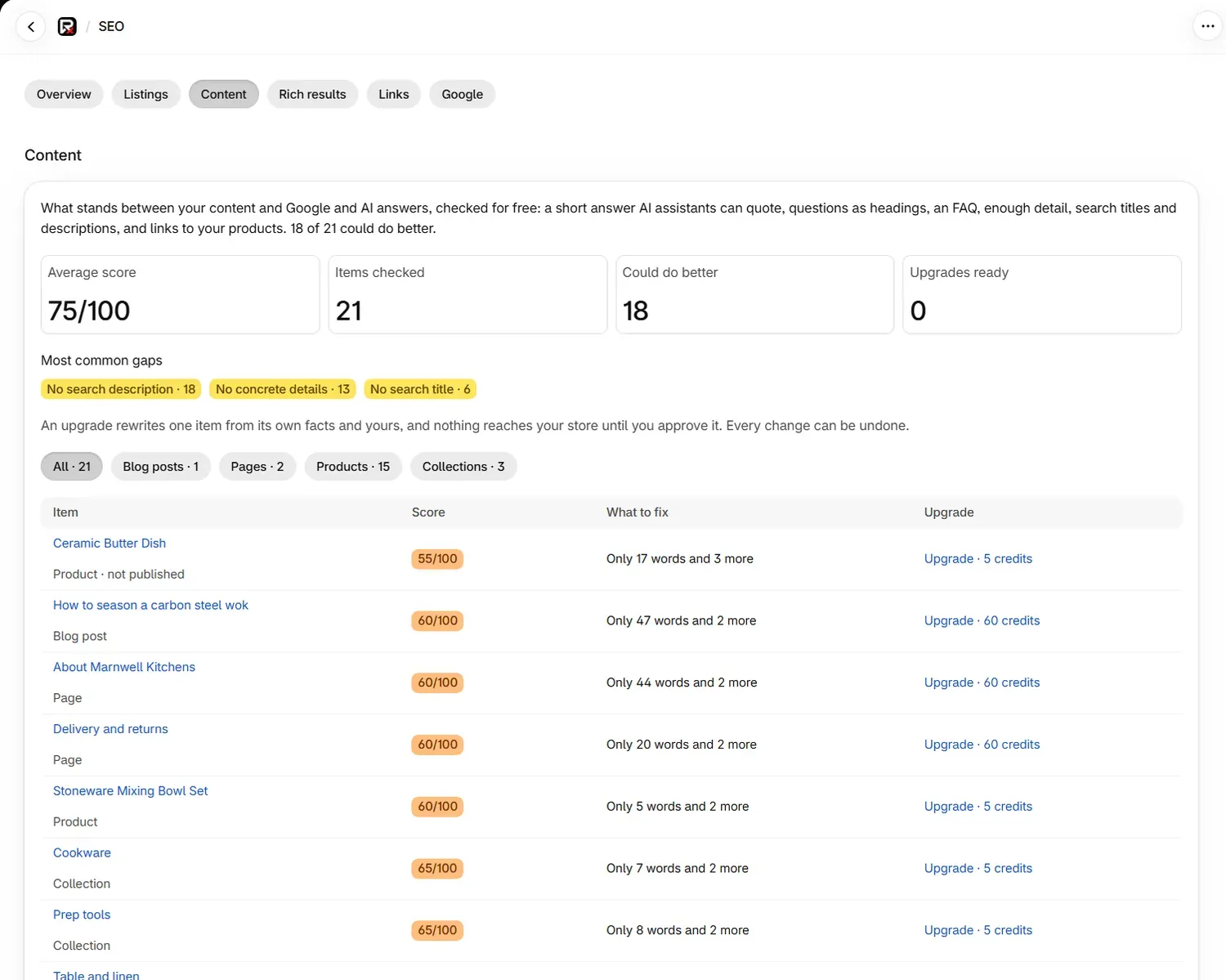
| Figure | Meaning |
|---|---|
| Average score | The mean score of what was checked |
| Items checked | How many items are in the list |
| Could do better | Items scoring below 90 |
| Upgrades ready | Upgrades written and waiting for you |
The list is read fresh from your store on each visit, worst first, 25 rows at a time. Use All, Blog posts, Pages, Products and Collections to narrow it. It covers up to 50 blog posts, 30 pages, 100 products and 30 collections, and leaves out utility pages, the built-in collections, archived products and gift cards.
What does each gap mean?
The number in a label comes from your own text.
| Gap | Impact | Applies when |
|---|---|---|
| This item has no text (named as article, page, product or collection) | High | Any item |
| Only 40 words | High | Below 500 words on an article, 120 on a page, 50 on a product, 30 on a collection |
| No short answer at the top | High | The first block of an article is not a paragraph of 20 to 90 words covering half the title's words |
| Few or no section headings | High on articles, medium on pages | 300 words or more with under 2 headings |
| No headings phrased as questions | Medium | Articles |
| No FAQ | Medium | Articles of 300 words or more |
| No links to your products | Medium | Articles |
| The description does not open by saying what it is | Medium | Products |
| No concrete details | Medium | Products |
| Phrases that read as AI-written | Medium | Any item |
| Notes about what the store has not done | Medium | Any item |
| Does not speak as your store | Medium | Articles of 300 words or more |
| 2 images in the text without alt text | Medium | Any item |
| No search description | Medium | Any item |
| No search title | Medium on long-form items, low on others | Any item |
| 1 very long paragraph | Low | Paragraphs above 120 words |
| No lists | Low | Articles of 600 words or more |
| Capitals, exclamation marks or hype words | Low | Products |
| Search title is 70 characters | Low | Above 60 characters |
| Search description is 180 characters | Low | Above 160 characters |
| Search description is only 40 characters | Low | Below 70 characters |
| Not updated for 20 months | Low | Articles older than about 18 months |
Open an item to read why each gap matters and how to fix it. Each card ends with one of three notes: an upgrade fixes it; an upgrade writes it too, or you can edit it for free in Listings; or you fix it yourself by editing the page.
How do I write an upgrade?
Open the item
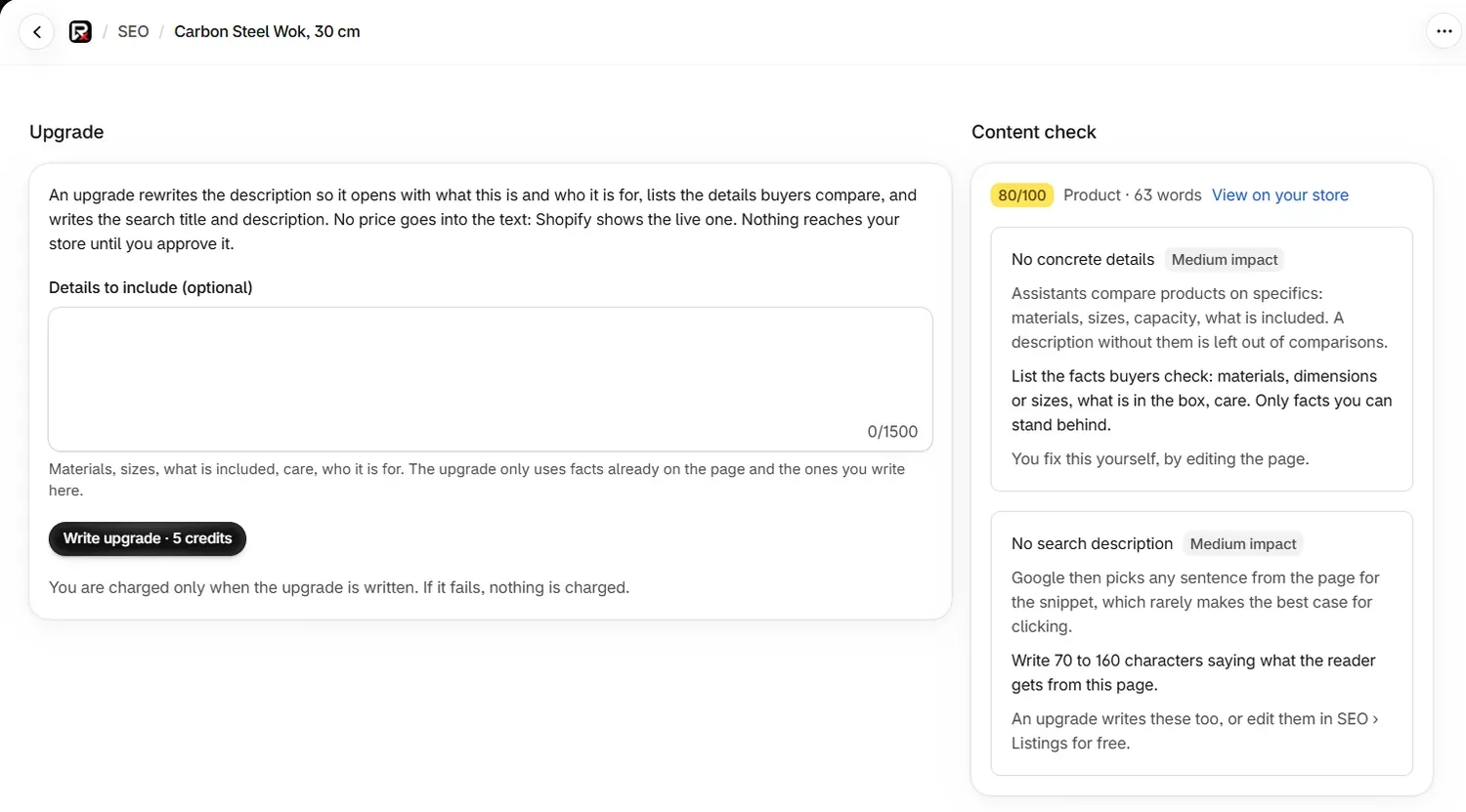
On the Content tab, select an item, or the Upgrade link beside it. The Content check column shows its score and gaps.
Add what you know
This step is optional and worth doing. On a product or collection, use Details to include (optional) for materials, sizes, what is included, care and who it is for. On a blog post or page, use What you know (optional) for what you recommend, what you have seen and what customers ask. The upgrade uses facts already on the page and the ones you write here, up to 1,500 characters.
Write the upgrade
Select Write upgrade, shown with its price. It takes about a minute for a blog post or page, and under half a minute for a description.
Review it
The page shows the score before and after, What changed, Still to fix and the new Search result. Switch between New version and Current version to compare. Read any Check before applying banner, which names figures that are not in your current text, links removed, or items moved to the end.
Apply or discard
Select Apply to my store to replace the text and search fields on your live store, or Discard to leave them as they are.
To apply several, select Apply all ready upgrades on the Content tab, up to 50 at a time.
What does an upgrade change?
On a blog post or page, an upgrade puts a short answer on top, phrases questions as headings, adds an FAQ of up to 6 questions under the heading "Frequently asked questions", adds links to your products, and writes the search title and description. A blog post or page with 2 or more FAQs also gets FAQ structured data in its text.
On a product or collection, it rewrites the description so it opens with what the item is and who it is for, lists the details buyers compare, and writes the search title and description. No price goes into the text, because Shopify shows the live one.
Images, tables, videos and embeds come back unchanged. The upgrade never claims experience you did not describe.
What does each upgrade state mean?
| State | Meaning |
|---|---|
| Upgrade · 60 credits or Upgrade · 5 credits | Ready to write, at that price |
| Not needed | The check found nothing to fix. You can still write one by adding new details |
| Upgrade being written | It is in progress. You can leave the page |
| Upgrade ready to review | Waiting for you to apply or discard it |
| Applying | It is going to your store |
| Upgrade applied | It is on your store, and the page shows the score change |
| Upgrade stopped | It did not finish, and nothing was charged |
| Upgrade undone | It was undone in Changes, so your store has its earlier text |
What does an upgrade cost?
| Action | Cost |
|---|---|
| The content check, score and gaps | Free |
| Write an upgrade, blog post or page | 60 credits |
| Write an upgrade, product or collection | 5 credits |
| Apply, discard or undo | Free |
You are charged when the upgrade is written and ready to review, and discarding it after that does not return the credits. If writing fails, nothing is charged. See Credits for what happens when you run out.
How do I undo an upgrade?
Open Changes and undo it there. Your store goes back to its earlier text, and you can write a new upgrade whenever you like.
Common problems
| What you see | Cause | What to do |
|---|---|---|
| "This text was edited after the upgrade was written, so it was not applied." | The item changed in Shopify after the upgrade was written | Write a new upgrade from the current text |
| "The check found nothing an upgrade would fix here." | The item has no gaps | Add new details in the box, then write one |
| "This has very little text to work from" | A product or collection has under 30 words | Add details in the box, which make the biggest difference |
| "The upgrade stopped. Nothing was charged. Try again." | Writing did not finish | Select Write upgrade again |
| "Upgrades are included in every paid plan." | You are on the Free plan | Choose a plan |
| "We could not read your ... just now" | That kind of item could not be read on this visit | Reopen the tab |
What to do next
Questions
What is a content upgrade?
An upgrade rewrites one blog post, page, product description or collection description so it covers the gaps the check found. You see the new version first, and nothing reaches your store until you apply it.
How much does an upgrade cost?
60 credits for a blog post or page, and 5 credits for a product or collection. Applying, discarding and undoing are free. The app shows the live price on each button.
Do I get credits back if I discard an upgrade?
No. Credits are charged when the upgrade is written and ready to review. If writing fails, nothing is charged.
Will an upgrade remove my images?
No. Images, tables, videos and embeds come back unchanged in the new version.
Last updated