Rich results, llms.txt and agents.md
What Google can read on your pages, the Extra product info embed, and the files Shopify publishes.
The Rich results tab shows the product, business and page details Google can read on your live store, and what is missing. Google uses those details for richer results, such as price, stock and ratings beside a product. The same tab holds the free Extra product info embed and a check of the llms.txt and agents.md files Shopify publishes for you.
Before you start
- Every plan, including Free. Nothing on this tab uses credits.
- Open SEO, then the Rich results tab.
- Your storefront needs to be open. While a store has a password, neither Google nor RankX AI can read its pages, and the tab says so.
What can Google read on my pages?
What Google can read on your pages reads one sample of each kind of page and shows a card for Home page, Collection page and Product page. Each finding carries a badge: Found, Missing or Problem.
| Page | When found | When not |
|---|---|---|
| Product | Product information Google can read | No product information Google can read, or The product is described 2 times |
| Product | Price and stock | Price or stock missing |
| Product | Brand | No brand |
| Product | Barcode (GTIN) | No barcode (GTIN) |
| Product | Shipping details | No shipping details |
| Product | Return policy | No return policy |
| Product and collection | Breadcrumbs | No breadcrumbs |
| Home | Your business | Your business is not described |
| Home | Site name | No site name |
| Any | 1 block Google cannot read |
Shipping and returns are set once for the whole store in Google's own tools, Search Console or Merchant Center, and Google then shows them on every product. The tab links to how to add them.
A missing barcode or brand is fixed on the product. See Barcodes.
How do I turn on Extra product info?
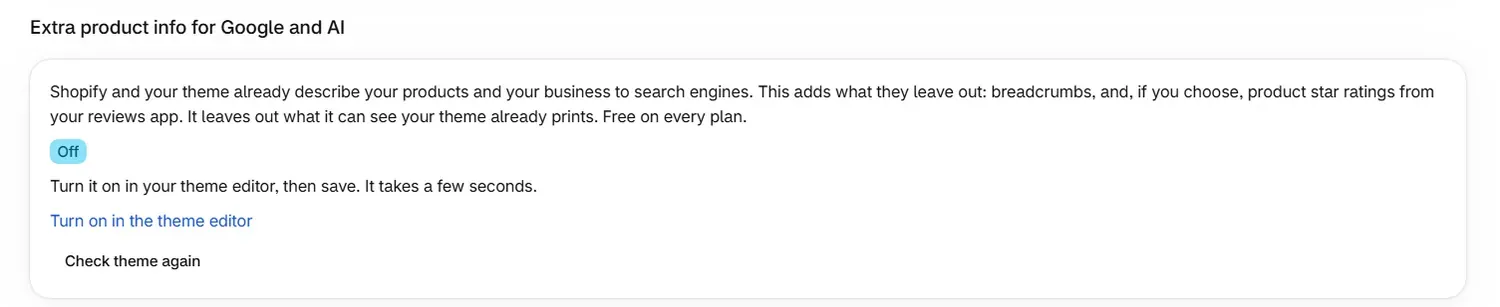
Extra product info for Google and AI is a free theme embed. Shopify and your theme already describe your products and your business to search engines, and the embed adds what they leave out: breadcrumbs and, if you choose, product star ratings from your reviews app. It leaves out what it can see your theme already prints.
Open the theme editor
Select Turn on in the theme editor. Your theme editor opens, and the embed is listed under App embeds.
Switch it on and save
Switch on the RankX AI embed, then save the theme. It takes a few seconds.
Confirm it
Come back to the app and select Check theme again. The badge changes to On.
| Badge | Meaning |
|---|---|
| On | The embed is on in your live theme |
| Off | Turn it on in your theme editor, then save |
| Not checked | The theme could not be checked just now. Your theme editor shows it under App embeds |
| Checking | The app is checking your live theme |
Home shows a badge of its own, such as Extra product info on. For your live theme, go by the badge on the Rich results tab.
What are llms.txt and agents.md?
Shopify publishes /llms.txt and /agents.md for your store. These are the files AI assistants read to learn what your store is. The check is free on every plan. Google says llms.txt will neither help nor harm a store in Google Search, and AI assistants and shopping agents may read it.
To see where your file stands:
- In llms.txt and agents.md, select Check my file.
- Read Your file now, which says how many of the things assistants look for it covers, and names what is missing.
- Select View your current file to read it.
Shopify writes this file from your store, so you fill a gap at the source. Add the detail to your store, such as your policies, product details or store contact, and it appears in the file.
Common problems
| What you see | Cause | What to do |
|---|---|---|
| "Your store has a password, so neither Google nor we can read its pages." | The storefront is password-protected | Remove the password in your Online Store preferences when the store is ready to open |
| "Your store is password-protected, so assistants cannot read these files" | The same, for llms.txt and agents.md | Remove the password when the store is ready to open |
| The product is described 2 times | Two sources on the page each describe the product, often the theme and an app | Check which apps add product details to your pages, and keep one |
| No product information Google can read | The theme printed no product details on the sample page | Check your theme's product template, or ask your theme's support team |
| "Your pages could not be read just now." | The storefront did not answer | RankX AI checks again every day |
| The badge still says Off after saving | The embed was switched on in a theme that is not live, or the check ran before the save | Save in your live theme, then select Check theme again |
What to do next
Questions
How do I turn on the Extra product info embed?
Open SEO, then Rich results, and select Turn on in the theme editor. Switch the embed on under App embeds, save, then come back and select Check theme again. It is free on every plan.
Does the embed repeat what my theme already prints?
No. It leaves out what it can see your theme already prints, and adds what is missing, such as breadcrumbs.
Who writes llms.txt and agents.md for my store?
Shopify publishes both files and writes them from your store. To fill a gap, add the detail to your store, such as your policies, product details or store contact.
How do I add shipping and returns to my rich results?
Shipping and returns are set once for the whole store in Google's own tools, Search Console or Merchant Center. Google then shows them on every product.
Last updated