Permissions the app requests
Every Shopify permission RankX AI requests, what it is used for and what it never touches.
RankX AI asks Shopify for access to your products, content, files, redirects and a few read-only settings, and it does not ask for your customers or orders. Shopify writes the words on the install screen from that list, and those words describe what each permission could reach. This page sets out what RankX AI actually reads and writes. The permissions are the same on every plan, including Free.
What does the install screen say?
Before you install, Shopify shows This app needs access to: followed by two groups:
- View staff and contributor data. Store owner (Name, email address, phone number, physical address) and Blog contributors (Email address, IP address, browser and operating system).
- View and edit store data. Products, Online Store, custom data, Shopify admin, other data.
Below them are a link to the privacy policy, then Cancel and Install.
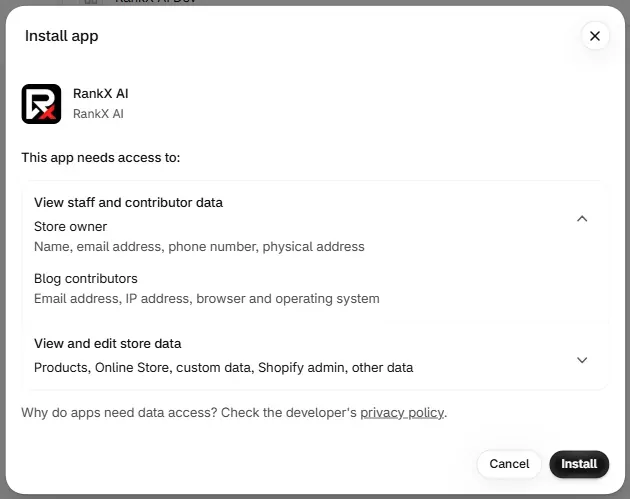
Why does the screen list more than RankX AI reads?
That wording is Shopify's generated summary, the same for any app that asks for the same permissions. RankX AI does not write it and cannot change it. Shopify groups permissions into broad labels and lists everything a permission could reach, so the summary reads wider than what the app uses.
Here is what those lines mean for RankX AI:
| Shopify's wording | What RankX AI actually reads |
|---|---|
| Store owner: name | Your store's name. Not the owner's personal name. |
| Store owner: email address | Your store's contact and store email addresses, as Shopify holds them. |
| Store owner: phone number | Not read. |
| Store owner: physical address | Your billing country only. Not a street address. |
| Blog contributors: email, IP address, browser and operating system | Not read. These come from blog comments, which the content permission covers. RankX AI reads no comments. |
What does each permission do?
The app requests 13 Shopify permissions, all required.
| Permission | What RankX AI reads | What RankX AI writes |
|---|---|---|
read_products, write_products | Your products, for the product check, monitored products and product pages | Categories, barcodes, search fields, search visibility, category details, photos and listing copy, plus collection search fields |
read_content, write_content | Pages, blogs and articles | Creates a blog, creates and updates articles, takes an article down, updates pages and their search fields |
read_files, write_files | Content › Files, for image checks and choosing a featured image | Uploads images, and sets alt text or a file name |
write_online_store_navigation | Your redirects | Creates, updates and deletes redirects. Menus are not touched. |
read_publications | Whether a product is published to the Online Store | Nothing |
read_themes | Whether the RankX AI embed is on, for the SEO check | Nothing |
read_legal_policies | Whether your refund, privacy and terms policies are filled in | Nothing |
read_metaobjects, write_metaobjects, write_metaobject_definitions | Category detail values | Values such as Colour, Material and Age group, stored in Shopify's own standard definitions |
At install, the app also reads basic store facts: your store's name, addresses, contact email, description, currency, time zone, billing country, Shopify plan name and up to 10 product types.
When does the app change my store?
RankX AI writes to your store only in these cases:
- You approve a change, such as saving a fix, applying a template, or publishing an article.
- You marked a template as automatic. It then fills empty search titles, descriptions and alt text on new active products, and never overwrites what is there.
- You switched on Redirect a deleted product's address automatically in Settings.
Each one is listed in Changes.
What does the app not read or keep?
- Customers and orders. Neither is requested, so the app holds no information about your buyers.
- Payment details. Billing is Shopify's. The app receives your plan and its status.
- The owner's name, phone number and street address.
- Blog comments.
- Staff names and email addresses. For each person who opens the app, RankX AI keeps their Shopify staff ID, whether they are the owner or a collaborator, and when they first and last opened it.
- Your theme code. Theme access is read-only, so the app cannot edit a theme.
- Translations, locales and Shopify Markets settings. The Market in RankX AI is a setting you choose in the app.
Can I turn a permission off?
Every permission is required for the app to work, so there is nothing to switch off one by one. To remove all access, uninstall the app, which clears RankX AI's access to your store.
Common problems
| What you see | Cause | Fix |
|---|---|---|
| Shopify's screen lists owner and contributor data | Shopify's generated summary | Nothing to fix. The tables above show what is read. |
| "We can't check your store policies yet" in Advanced | The app is waiting for you to approve updated permissions. | Reopen RankX AI from your Shopify admin and approve them. |
What to do next
- See what data RankX AI stores.
- Read the privacy policy.
- Install the app.
Questions
Does RankX AI read my customers or orders?
No. The app does not request access to customers or orders, and it holds no information about your buyers.
Why does the install screen mention the store owner's phone and address?
Shopify generates that wording from the permissions an app asks for, and it describes what those permissions could reach. RankX AI does not read the owner's name, phone number or street address.
Why does the install screen mention blog contributors?
The permission for blogs and pages also covers blog comments, which is where Shopify's wording comes from. RankX AI reads no blog comments.
Can RankX AI edit my theme?
No. The app has read-only access to your theme, and uses it to see whether the Extra product info embed is switched on. You turn that embed on yourself.
Last updated