ChatGPT and Google AI Mode checks
How often checks run, what each one costs in credits, and how Check now works.
A check asks an AI assistant one of your shopper questions and looks at the products shown for it. Checks run on a schedule you choose, and you can run one at any time with Check now. Each check of a question costs 25 credits at the time of writing, and the app shows the live price above your list and on its priced buttons.
Before you start
- Plan: scheduled checks and Check now need Starter, Growth, Pro or the free trial. The Free plan has its own free check, described below.
- Questions: you need at least one active shopper question.
- Credits: see Credits for what your plan adds each month.
What happens in one check?
Every shopper question has two halves, and one check covers both.
| Half | What is checked | Shown as |
|---|---|---|
| Answers | What each AI assistant says when asked the question | ChatGPT, Gemini, Perplexity |
| Products | The product results shown for the question | ChatGPT Shopping, Google AI Mode |
Pause and Check now act on both halves together. RankX AI looks for your store in the answers using the Store name in Settings, so make sure that name is the one shoppers know.
How much does a check cost?
The app says it like this:
Each check of a question costs 25 credits (3 AI assistants and 2 shopping results), whether you press Check now or it runs on its schedule, and whether or not the answer shows products.
The price is 5 credits for each place checked.
| Action | Credits |
|---|---|
| One question, 3 AI assistants and 2 shopping results | 25 |
| One question with Google AI Mode switched off | 20 |
| Suggest questions | 5 a press |
| Why not mine? | 5 |
| Write a better listing | 5 |
| Ask again in What AI says about you | 15 (the first ask is free) |
These are free: adding, pausing and resuming questions, monitoring products, reading any result, changing how often checks run, setting a question's type, Compare prices and See result in Changes.
Your first check after setup is included, so it does not use your credits. After that, the prices above apply.
How do I choose how often checks run?
Open Settings
Go to Settings and find How often we check your questions. You can also select Change how often on the Shopper questions view.
Pick a schedule
In Check every question, choose Every day, Every 3 days or Every week. The choice saves at once and applies to both halves.
Read the forecast
Below the field, the app shows what the schedule uses, such as "On this schedule your questions use about 2,464 credits a month, and your plan adds 5,000."
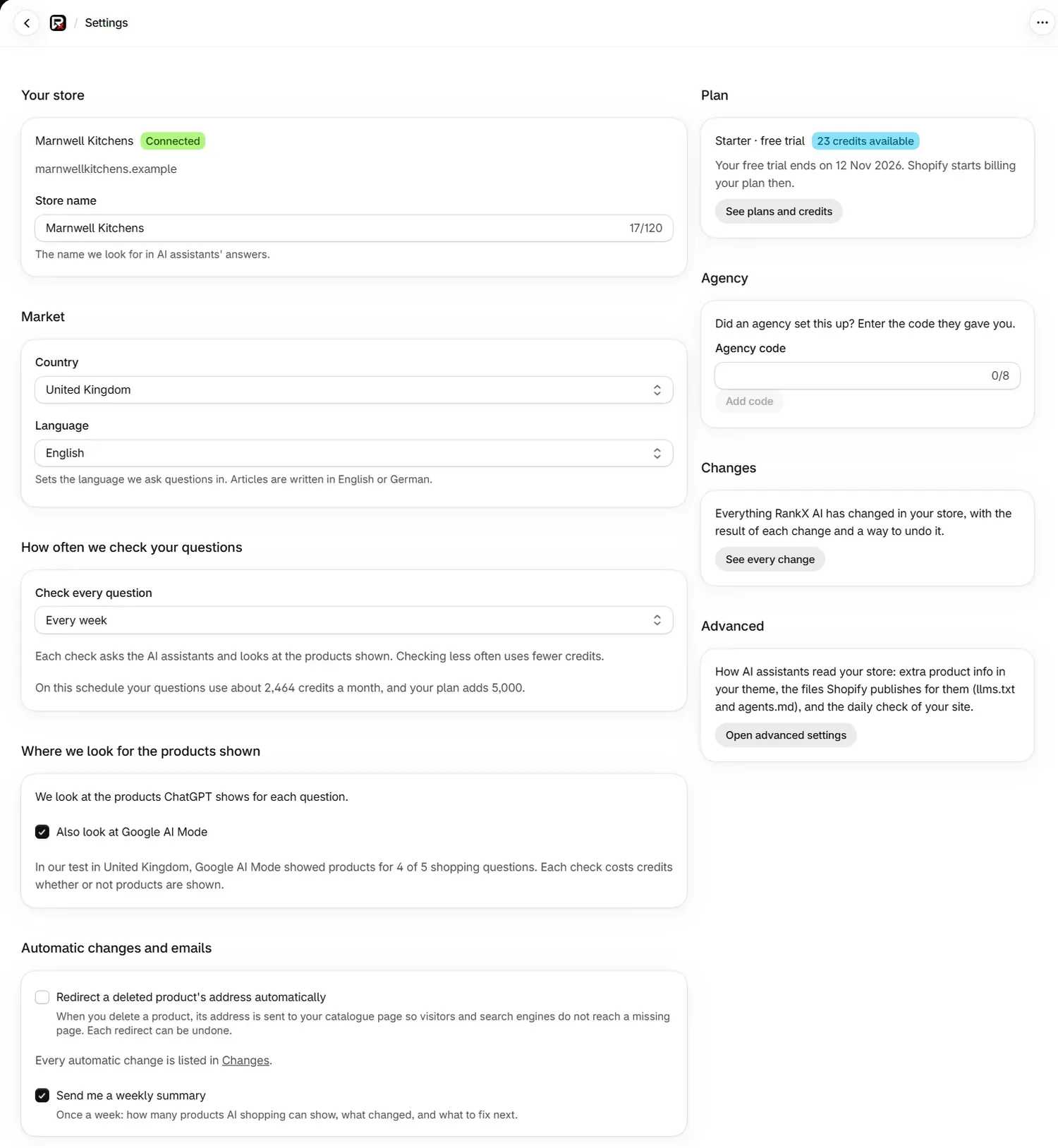
Setup starts every store on Every week, which fits every plan even with its question limit full. If you choose a faster schedule, read the forecast. When it is above what your plan adds, the app warns you that scheduled checks stop when your credits run out, so pick a slower schedule or pause some questions.
During the free trial, checks run every 7 days at most, even if Settings shows a faster choice. The line above your questions shows the schedule in use, for example "Checked every 7 days during your free trial. Next check: 12 Nov 2026."
Scheduled checks run each night: products from 21:00 UTC and AI assistants from 22:00 UTC.
How many credits will my schedule use?
The forecast in Settings is the number to go by, because it uses your real question count and prices. As a guide, here is 10 questions at 25 credits each over a 30-day month.
| Schedule | Credits a month, roughly |
|---|---|
| Every day | 7,500 |
| Every 3 days | 2,500 |
| Every week | 1,070 |
Plans add 5,000 (Starter), 12,000 (Growth) or 25,000 (Pro) credits a month. The trial includes 1,000 credits, which covers 40 checks of a question.
The weekly ask in What AI says about you sits outside this forecast and uses 15 credits each time.
How do I run a check now?
Choose the question
Go to AI search. Select Check now beside a question, or open the question and select Check now · 25 credits.
Wait for the results
You will see "Check started", and the list shows Checking… beside each place. Results appear one at a time, usually within a few minutes.
Three limits keep checks in order:
- One check runs at a time on your store.
- A question can be checked by hand again after 5 minutes.
- A paused question has no Check now until you resume it.
Before a check starts, the app confirms you have enough credits for the whole price. If you do not, it stops and nothing is charged.
What does the Free plan check?
On Free, RankX AI asks AI assistants like ChatGPT and Gemini 3 of your questions, and checks the products ChatGPT and Google show, every 4 weeks at no cost. It uses your 3 oldest active questions. If no products are monitored, it monitors up to 10 so answers can be matched to them.
Check now and Suggest questions are part of the paid plans, and the line under the list names the plan that includes them. To check all your questions on a regular schedule, choose a plan.
What happens when a check fails?
A check that fails is not charged. The credits held for it go back to your balance, and the question shows a line such as "Couldn't check ChatGPT · not charged". A failed check is never counted as "not named" and is left out of every percentage on the page. The question is simply checked again on its next scheduled run.
What do the schedule lines mean?
| Line | Meaning |
|---|---|
| "Checked every 3 days. Next check: 8 Nov 2026." | The schedule in use, with the next date |
| "Checked every 7 days during your free trial." | Your trial schedule |
| "AI assistants: ..." and "Products: ..." | The two halves have different next dates, or different schedules |
| "Your checks are scheduled." | Checks are on. The next date could not be read just now |
| "Scheduled checks are paused because your credits ran out." | They start again when your next credits arrive |
| "Nothing is scheduled until you choose a plan." | No plan or trial is active |
If the two halves have different schedules, Check every question shows Choose how often. Pick a schedule to set both.
Common problems
| What you see | Cause | Fix |
|---|---|---|
| "This needs 25 credits and you have 10. Your next credits arrive with your plan. Nothing was charged." | Your balance is below the price | Wait for your next credits, or change plan |
| "Another check is running on this store. Try this one again in a minute. Nothing was charged." | One check runs at a time | Try again in a minute |
| "This question was checked by hand a moment ago. You can run it again in about 3 minutes." | The 5-minute wait applies | Try again after that time |
| "This question is not being checked." | The question is paused | Select Resume schedule first |
| "You're on the Free plan. This is included in every paid plan." | Check now is a paid feature | Choose a plan |
| "Shopify has paused your plan because of a billing issue." | Shopify has paused billing | Resolve it in your Shopify admin. The feature returns afterwards |
| "The price of a check could not be read just now, so Check now is unavailable." | The price did not load | Reload the page |
The full list is on Error messages.
What to do next
Questions
How many credits does one check use?
Each check of a question costs 25 credits: 5 for each of the 3 AI assistants and 5 for each of the 2 shopping results. With Google AI Mode switched off it costs 20. The price is the same for Check now and for scheduled checks.
Am I charged if no products are shown?
Yes. A check is charged whether or not the answer shows products, because the question was asked and the answer read. A check that fails is not charged.
How often are my questions checked?
You choose Every day, Every 3 days or Every week in Settings. Setup starts you on Every week. During the free trial, checks run every 7 days at most.
What happens when my credits run out?
Scheduled checks pause and start again when your next credits arrive with your plan. Check now is refused and nothing is charged.
Last updated