What AI says about you
Ask ChatGPT, Gemini and Perplexity about your store by name and fix what they get wrong.
A shopper who finds your store may ask an AI assistant about it by name, and this page shows what they would be told. RankX AI asks ChatGPT, Gemini and Perplexity one question, "What is your store, and what do customers say about it?", and flags anything that needs a look. The first time is free.
Go to AI search and select What AI says about you.
Before you start
- Plan: the first ask works on every plan, including Free. Ask again and the weekly ask need Starter, Growth, Pro or the free trial.
- Credits: the first ask is free once per store. Ask again costs 5 credits for each assistant, 15 in all at the time of writing. The button always shows the live price.
- Store name: RankX AI asks using the Store name in Settings. Make sure it is the name shoppers know.
How do I ask about my store?
Open the view
Go to AI search, then select What AI says about you.
Ask
Select Ask now, free. You will see "Asking now, free", and each answer appears as it arrives. This takes a few minutes.
Read the summary
The top section says who was asked and when, how many things need a look and how many answers look right.
Read the answers
Each assistant has its own card, with a badge and the words behind it. Select Read the answers for the full text.
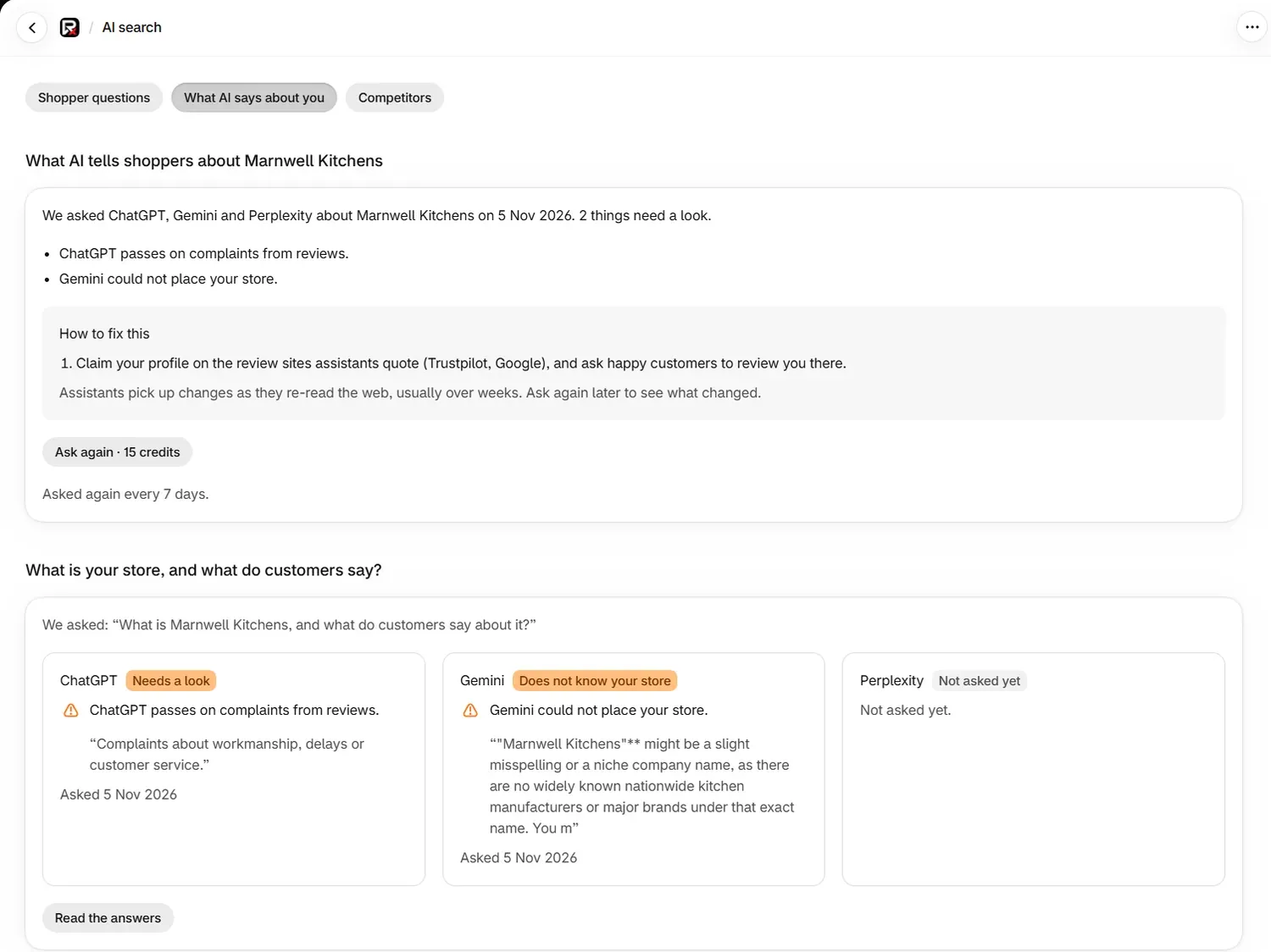
The question is written with your store's name, for example "What is Marnwell Kitchens, and what do customers say about it?" It uses none of your question places, and its answers are kept apart from Shopper questions, Competitors and your rates.
How often is it asked again?
On a plan, the question is asked again every 7 days and the page says "Asked again every 7 days." Each weekly ask uses credits at the same rate as Ask again. It is not part of the forecast in Settings.
Select Ask again · 15 credits to ask at any other time. Without a plan, the page says "On a plan, this is asked again every week."
What does each badge mean?
| Badge | Meaning |
|---|---|
| Looks right | The answer describes your store and nothing was flagged |
| Nothing to flag | There is nothing in the answer to act on |
| Needs a look | Something in the answer is worth reading |
| Does not know your store | The assistant could not place your store |
| Asking now | The answer has not arrived yet |
| Not asked yet | The assistant has not been asked |
| Did not answer | The assistant gave no answer this time |
| No answer kept | The words of the answer are no longer stored |
What do the findings mean?
Each finding starts with the assistant's name, such as "Gemini could not place your store."
| Finding | What it means |
|---|---|
| "could not place your store." | The assistant found too little to say who you are |
| "read about your store on a site with your name that is not yours." | It used a site that shares your name. The app names that site |
| "may be describing a different business with the same name." | The answer may not be about you at all |
| "found no reviews of your store." | It found no reviews to pass on |
| "reports a rating of 3.8 out of 5 from 40 reviews on a site." | A rating and its source. Below 4 is flagged and 4.5 or above counts as good |
| "gives no rating, though 12 of your products show reviews on your store." | Your store has reviews that the assistant did not use |
| "passes on complaints from reviews." | Shoppers would read those complaints |
| "did not use your own website for this answer." | The answer came from other sources |
| "describes your store from your own website." | It used your site, which is what you want |
| "drew on reviews from a list of sites." | These are the sites shaping what it says about customers |
How do I fix what assistants get wrong?
When something needs a look, the box How to fix this lists the steps that apply. They are things you do on your own site and profiles.
| Step | Where to do it |
|---|---|
| Say who you are in your own words on your home page and About page | Select Open Pages |
| Keep your llms.txt accurate | Select Open llms.txt. See Rich results, llms.txt and agents.md |
| Link to your site from your profiles | On each profile you own |
| Claim your profile on the review sites assistants quote, and ask happy customers to review you there | On those review sites |
Assistants pick up changes as they re-read the web, usually over weeks. Ask again later to see what changed. The answers come from the assistants, so this page shows what they say and helps you improve what they read.
What does "Where AI read about you" show?
Where AI read about you lists the sites the answers used, with Site and Answers columns.
| Badge | Meaning |
|---|---|
| Your site | Your own store |
| Uses your name, not yours | A site that carries your name and belongs to someone else |
A site with no badge is a third party, such as a review site or a directory. Those are good places to check your details and claim a profile.
Common problems
| What you see | Cause | Fix |
|---|---|---|
| "We do not know your store's name yet, so there is nothing to ask about. Nothing was charged." | The store name is missing | Fill in Store name in Settings |
| Ask again is switched off | You are on Free, or have no active plan | Choose a plan |
| "This needs 15 credits and you have 5." | Your balance is below the price | Wait for your next credits, or change plan. Nothing was charged |
| Does not know your store | Your store is new or little written about | Work through How to fix this, then ask again in a few weeks |
| The answer describes another business | Another business shares your name | Make your home page and About page specific about what you sell and where |
| "We could not read what AI says about your store just now." | The page did not load | Reload the page |
What to do next
- Set up your llms.txt and rich results
- Add shopper questions for your category
- See which stores AI answers show
Questions
Is the first ask really free?
Yes. Ask now, free works once per store on any plan, including Free. After that, Ask again shows its price on the button, which is 15 credits at the time of writing.
Does this use one of my shopper question places?
No. The app's question about your store is separate. It uses none of your question allowance, and it is left out of Shopper questions, Competitors and your rates.
How often is my store asked about?
On a plan, the question is asked again every 7 days, using credits at the same rate as Ask again. You can also select Ask again at any time.
How long until assistants pick up a change?
Assistants pick up changes as they re-read the web, usually over weeks. Ask again later to see what changed.
Last updated