Add shopper questions
Add the questions buyers ask AI assistants, with limits per plan and how to pause them.
Shopper questions are the questions your buyers ask an AI assistant before they buy, in their own words, such as "best carbon steel wok under £60". RankX AI asks each question on ChatGPT, Gemini and Perplexity, and looks at the products ChatGPT Shopping and Google AI Mode show for it. You choose the questions, so the results describe the buying moments that matter to your store.
You will find them in AI search, on the Shopper questions view.
Before you start
- Plan: every plan, including Free, can add a question. Starter, Growth, Pro and the free trial check your questions on a schedule. On Free, the free check covers the 3 oldest active questions every 4 weeks.
- Suggest questions needs a paid plan or the trial, and at least one monitored product, because suggestions are written from your products.
- Market: questions are asked in the language and country set under Settings, in Market. Check that first if you sell outside your billing country.
Setup writes your first questions for you, so your list may already have some. See First-time setup.
What makes a good shopper question?
Write what a buyer would type before they have chosen a store. Questions about a category or a product type are the ones that bring up product results. Questions that name a brand almost never do.
| Works well | Works less well |
|---|---|
| best oak chopping board for a small kitchen | Marnwell Kitchens chopping boards |
| what kind of apron stops flour ruining my clothes | aprons |
| is a carbon steel wok better than non-stick | do you sell woks |
To see what assistants say about your store by name, use What AI says about you instead. That has its own question and uses none of your places.
How do I add a question myself?
Open the dialog
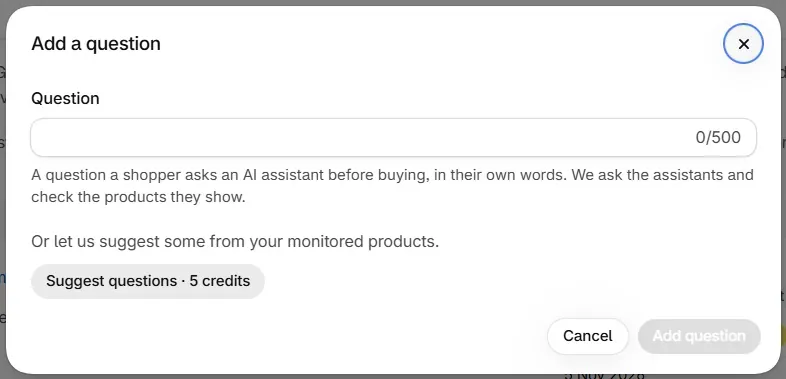
Go to AI search, then select Add a question.
Type the question
In Question, write it the way a shopper would, up to 500 characters.
Save it
Select Add question. You will see "Question added" and the question joins the list with the status Not checked yet.
The new question is picked up by the next scheduled check, or you can press Check now. See ChatGPT and Google AI Mode checks.
How do I get suggested questions?
Open the dialog
Go to AI search, then select Add a question.
Ask for suggestions
Under "Or let us suggest some from your monitored products", select Suggest questions · 5 credits. The button always shows the live price.
Check the list
The dialog closes and the new questions appear in your list. If no new question appears, none was written and nothing was charged.
The app writes only as many questions as fit your plan. Each suggestion is between 12 and 120 characters.
| Typed | Suggested | |
|---|---|---|
| Cost to add | Free | 5 credits a press, charged only if at least one question is written |
| Written from | Your own words | Your monitored products |
| Length | Up to 500 characters | 12 to 120 characters |
| Checks and schedule | The same | The same |
How many questions can I have?
| Plan | Questions |
|---|---|
| Starter | 25 |
| Growth | 50 |
| Pro | 100 |
A shopper question has two halves: the products shown, and what the assistants say. The plan page counts them as AI Shopping questions and AI answer questions, and the limit applies to each kind. A typed question uses one place of each.
When you reach your limit, Add a question is switched off and a line under the list tells you the plan that allows more, for example "You are using all 25 questions on Starter. Growth allows 50 questions." To make room, pause a question or change plan.
If you move to a smaller plan with more questions than it covers, the line reads like "You have 40 questions, and Starter covers 25. We check the oldest 25, and the other 15 wait. Stop some to choose which." To stop a question, pause it.
How do I pause a question?
Find the question
Go to AI search and find the question under Shopper questions.
Pause it
Select Pause, or open the question and select Pause schedule. You will see "Schedule paused", and the question shows the badge Paused.
Resume it later
Select Resume schedule to start checking it again.
Pausing stops both halves of the question and frees a place on your plan. The results so far stay on the question's page. Pausing and resuming are free.
There is no delete control in the app, so a question you no longer want can be paused. Resuming counts against your limit again, so it can be refused if your places are full.
Can I change a question's wording?
The words of a question stay fixed. To ask something different, add a new question and pause the old one. What you can change is the question's type.
What is the question type?
Each question page ends with Question type, which says where the buyer is and what the question is about. It is suggested from the wording, and you can correct it at no cost.

| Field | Choices |
|---|---|
| Stage | Discovery, Evaluation, Ready to buy |
| What it is about | Attribute, Budget, Use case, Comparison, Alternative, Audience, Brand |
Select Edit, choose the Stage and tick what applies under What it is about. Each change saves as you make it, so select Done when you finish. The note then reads "Set by you."
What does the Shopper questions list show?
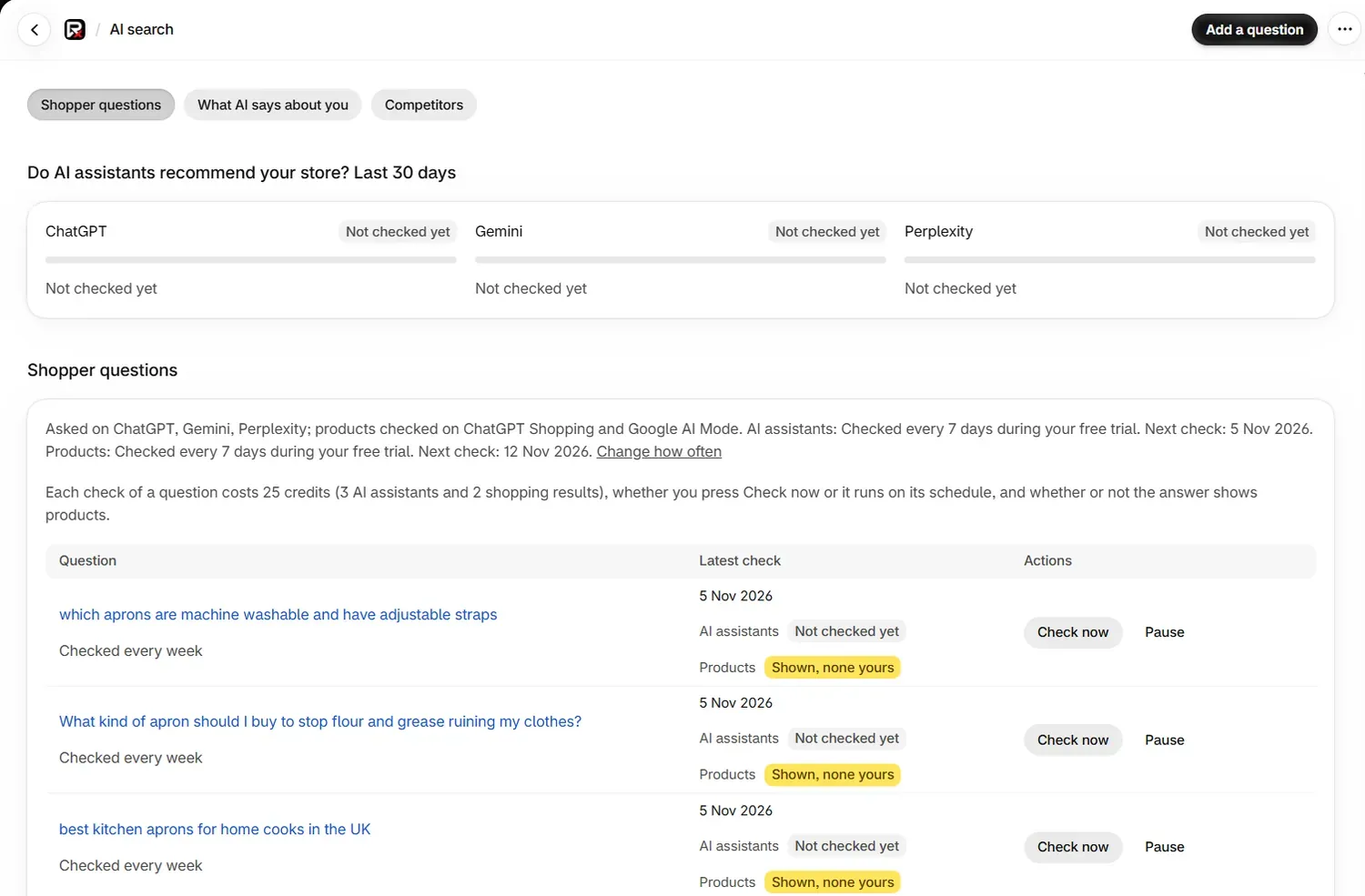
| Column | What it shows |
|---|---|
| Question | The question, which opens its own page, and how often it is checked, such as "Checked every week" |
| Latest check | The date, then one badge for AI assistants and one for Products |
| Actions | Check now, and Pause or Resume schedule |
Each badge is explained in Read your results.
Common problems
| What you see | Cause | Fix |
|---|---|---|
| Add a question is switched off | All your places are in use | Pause a question, or change plan |
| "You are using all the questions your plan allows. Stop another question first." | You resumed a question while your places were full | Pause another question, then resume this one |
| "Monitor a product first: suggestions are written from your products." | No products are monitored | Add some under Monitored products |
| Suggest questions ran but the list did not change | No new question could be written, or your places were full | Nothing was charged. Try again, or type the question yourself |
| "We could not generate questions this time. Nothing was charged." | The app could not write questions from your products this time | Try again, and check you have active monitored products |
| "Write the question a shopper would ask." | Question was left empty | Type the question |
| "No shopper questions are being checked" | Every question is paused, or none has been added | Resume or add a question |
What to do next
Questions
How many shopper questions can I add?
Starter allows 25, Growth 50 and Pro 100. Paused questions do not count, so pausing one frees a place.
Can I delete a shopper question?
The app has no delete control. A question you no longer want can be paused: it stops being checked, it frees a place on your plan, and its results stay on its page.
Does adding a question cost credits?
No. Typing a question, pausing it and resuming it are free. Suggest questions costs 5 credits a press, and only when at least one new question is written. Checks use credits when they run.
Can I edit the wording of a question?
No. The words of a question stay as they are. To change the wording, add a new question and pause the old one. You can change a question's type at any time.
Last updated