Alt text and image checks
Fix missing or poor alt text, small images and unclear file names in the RankX AI Shopify app, and read each image finding.
The image checks find product photos with missing or poor alt text, photos too small to look sharp, and file names that say nothing about the picture. Alt text is what screen readers, image search and AI assistants read in place of a photo. You can type it yourself for free, or have it written and review it before saving.
Before you start
- Every plan, including Free. Typing alt text is free.
- Write with AI uses credits and needs a paid plan or a trial. At the time of writing it costs 1 credit for each image, and the button always shows the live price.
- Your store needs a finished product check, so the issues are listed.
What do the image findings mean?
| Issue on Products | Label on the image | What it means | How you fix it |
|---|---|---|---|
| Images without alt text | No alt text | The image has no alt text. | Here |
| Alt text that does not describe the image | Alt text does not describe the picture | The alt text says nothing useful about the photo. The reason appears beside the label. | Here |
| Several images with the same alt text | Same alt text as another image | Two or more images of one product use the same words. | Here |
| Images too small to look sharp | Image too small to look sharp | The longest side is under 800 px. | Upload a larger photo in Shopify |
| File names that do not describe the image | File name that does not describe the image | The file name is a camera code, a screenshot name, a bare number, a random string or a generic word such as "main" or "untitled". | In Shopify, under Content › Files |
A value the app could not read gives no finding. These are not counted as missing.
When is alt text marked as not describing the picture?
| Reason shown | What triggers it |
|---|---|
| "It is too short to describe the picture." | Fewer than 5 characters. |
| "It repeats the file name." | The alt text matches the file name. |
| "It is a camera file code." | The alt text is a code such as DSC_0417. |
| "It says there is a picture, not what it shows." | A generic word such as "image". |
| "It is only numbers." | Digits and nothing else. |
| "Every image repeats the product title, so none says what it shows." | A product with two or more images uses its title as the alt text on all of them. |
What sizes and lengths does the app use?
| Measure | Rule |
|---|---|
| Too small | Longest side under 800 px. |
| Google Shopping | From 31 January 2027 Google Shopping requires product images of at least 500 × 500 px. The line appears if the shorter side is under 500 px. |
| Large original | Over 2 MB or over 4,000 px. Information only, never counted as an issue. |
| Alt text | Up to 512 characters, which Shopify's field accepts. A few words is usually enough. |
| Images read | Up to 50 for each product. The list shows 10, then Show all. |
How do I fix alt text?
Open the images
Go to Products, select Fix products beside an image issue, then select Fix images on a product. You can also open a product and select Go to Media.
Write the alt text
The Alt text box appears on each image with an alt text issue. Type a few words saying what the picture shows, such as the colour, the angle or the product in use.
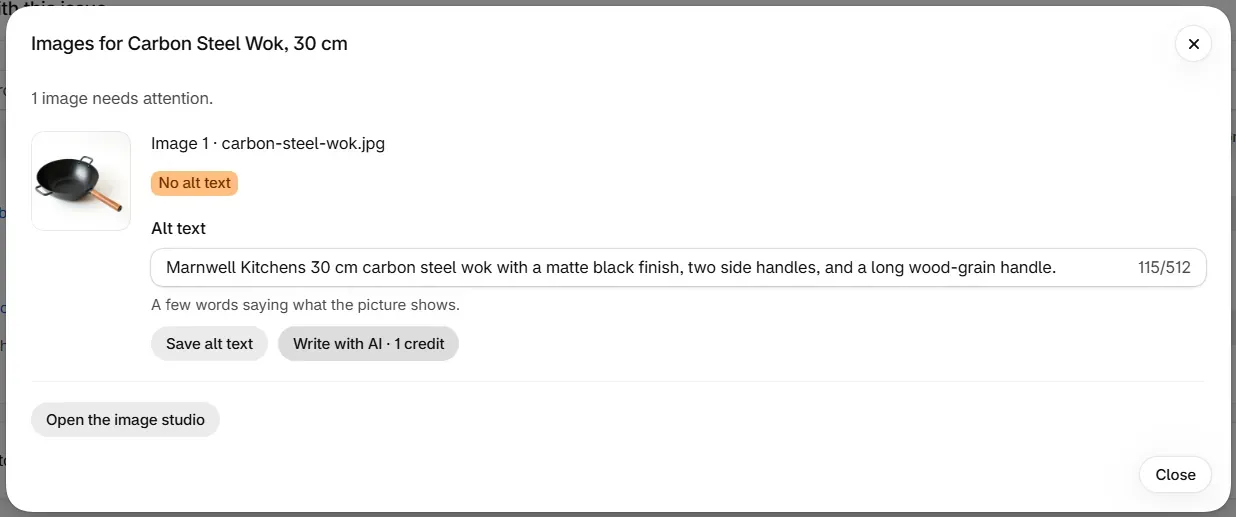
Or select Write with AI
Write with AI looks at the image and proposes alt text for you to review. Nothing is written to your store at this point.
Save
Select Save alt text. The change is read back from your store and listed in Changes, where you can undo it.
To fill empty alt text across many products from a pattern, use a template.
What does Write with AI refuse to write?
A suggestion is thrown away, and not charged, if it:
- is under 5 or over 160 characters
- starts with "image of"
- repeats the file name
- matches the current alt text
- makes a claim about price, stock, delivery, a guarantee or ranking
The message reads "We discarded that suggestion because" and gives the reason. Select Write with AI to try again. AI-written listings and alt text covers the other writing tools.
How do I fix a small image?
Shopify never enlarges an image, so a small one looks soft when a shopper zooms in. Upload a larger photo of the same view on the product's page in Shopify, at least 800 px on its longest side. Shopify suggests 2,048 × 2,048 px for square images, and Google recommends about 1,500 × 1,500 px.
The app reports the size and leaves uploading to you. If you have no larger photo, Open the image studio can make new ones from your own. See Image studio.
How do I fix a file name?
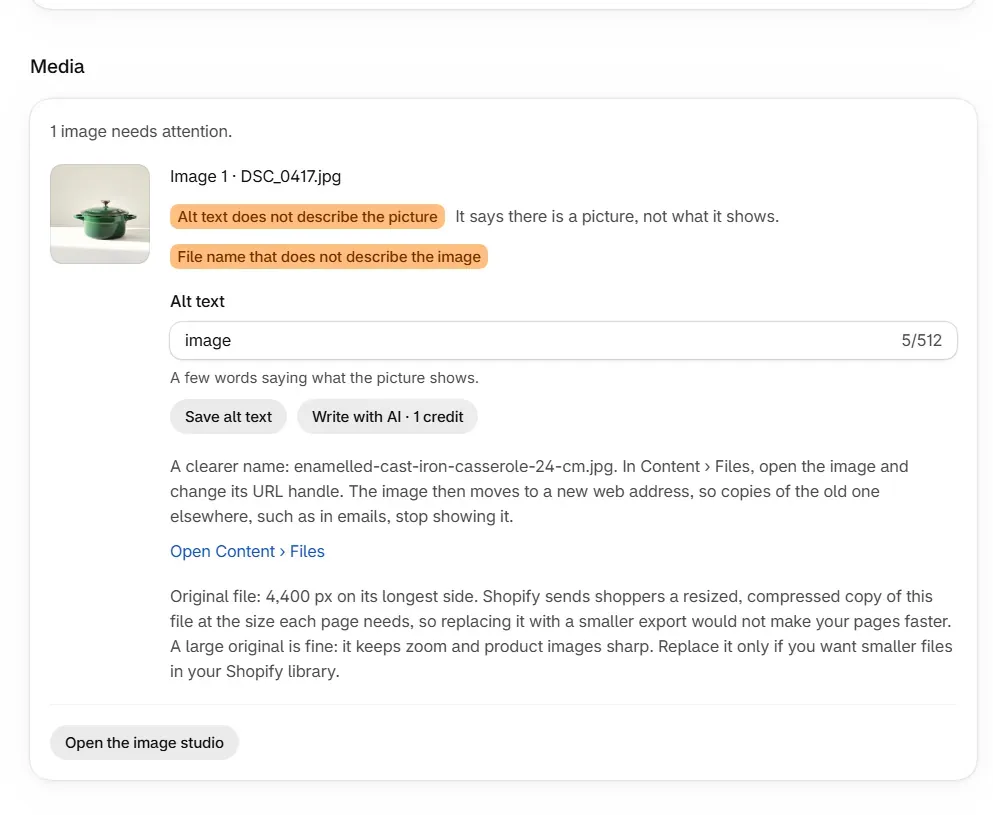
RankX AI suggests a clearer name, and you change it in Shopify.
Open Files
Select Open Content › Files under the suggested name.
Change the URL handle
Open the image and change its URL handle to the suggested name.
The image then moves to a new web address, so copies of the old one elsewhere, such as in emails, stop showing it.
Should I replace a large original image?
There is no need to. Shopify sends shoppers a resized, compressed copy of each file at the size each page needs, so replacing it with a smaller export would not make your pages faster. A large original keeps zoom and product images sharp. Replace it only if you want smaller files in your Shopify library.
What are the free studio photos?
After your first product check, RankX AI makes one free Studio photo of a product, marked On us. A store gets one, once, and it can be added on any plan. On the Free plan you also get an On a model and an In action preview, marked Free preview. Adding a preview to your store needs a plan, so select See plans. They can take a little while to appear.
Common problems
| What you see | Cause | What to do |
|---|---|---|
| "This product has no images." | AI shopping cannot show a product without one. | Add at least one on the product's page in Shopify. |
| "Shopify could not process" some images | The upload failed, so they have no picture. | Delete and upload them again on the product's page. |
| "Describe the image." | You saved an empty box. | Type a few words. |
| "That alt text is longer than Shopify accepts (512 characters)." | The text is too long. | Shorten it. |
| "We could not read this product's images just now." | The read failed. | Try again in a moment. |
| "That image is no longer in your store. Nothing was charged." | The image was removed. | Reload the product. |
| "We could not download that image to look at it. Nothing was charged." | The image could not be fetched. | Try again, or type the alt text yourself. |
| "That took too long. Nothing was charged. Try again." | The suggestion timed out. | Select Write with AI again. |
| A message that this needs credits | Your balance is too low for Write with AI. | Type the alt text for free, or see Credits. |
| No Alt text box on an image | The image has no alt text issue. | Nothing is needed. |
What to do next
- Have listings and alt text written for you
- Make new product photos in the image studio
- Fill empty alt text with a template
Questions
What is the minimum image size RankX AI checks for?
An image is flagged when its longest side is under 800 px. Shopify suggests 2,048 × 2,048 px for square images.
Should I replace large original images?
There is no need to. Shopify sends shoppers a resized, compressed copy at the size each page needs, so a large original is fine and keeps zoom sharp.
Does writing alt text cost credits?
Typing alt text yourself is free on every plan. Write with AI uses credits, and the button shows the price before you select it.
Does RankX AI rename image files?
No. It suggests a clearer name and shows you where to change it in Shopify, under Content › Files.
Last updated