Uninstalling
What happens to your plan, your data and your changes when you uninstall, and what reinstalling does.
Uninstalling RankX AI stops its checks and removes its access to your store, while everything it already wrote stays on your store. Your store's data in RankX AI is then deleted within 30 days. If you reinstall before that, your questions and results are still there.
Before you start
Do these first, because they need the app:
- Undo any change you want reversed. Undo works only while the app is installed. Go to Settings, then See every change.
- Cancel any scheduled article you do not want published. A scheduled article is held in Shopify with a future date, so cancel it on its page in Blog.
- Add any studio images you want to keep. Images you have not added go with your data.
- Ask for a copy of your data if you want one. See what data RankX AI stores.
How do I uninstall the app?
Open your apps
In your Shopify admin, go to Settings, then Apps.
Open RankX AI
Select RankX AI in the list, then select Uninstall app at the top of the page.
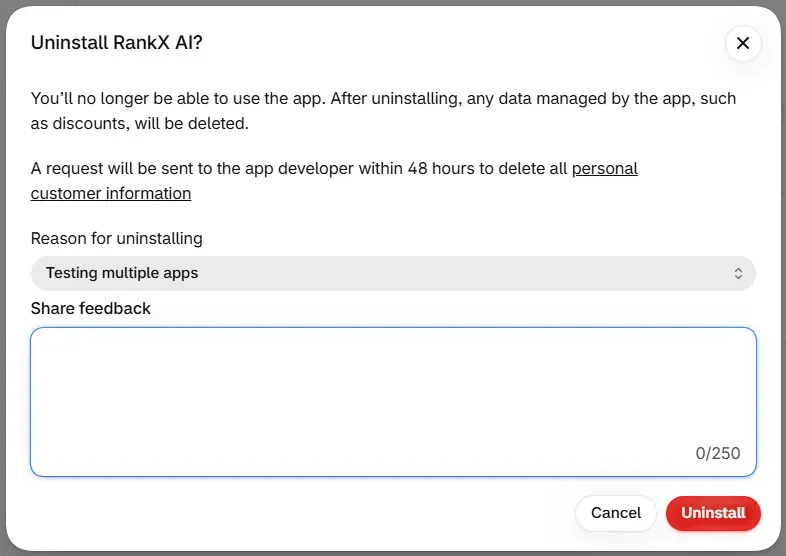
Choose a reason and confirm
Shopify asks for a reason under Reason for uninstalling. Pick at least one, then select Uninstall.
What happens straight away?
- Scheduled checks and other background work stop, including the daily site check.
- RankX AI's access to your store is cleared.
- RankX AI treats your plan as cancelled.
Billing is Shopify's. To see any charge, or to ask about one, go to Settings, then Billing, in your Shopify admin.
What stays on my store?
Nothing is reversed when you uninstall. These stay exactly as they are, in Shopify's own fields:
- Categories, category details and barcodes.
- Search titles, search descriptions and search visibility.
- Alt text and photos added to products.
- Redirects.
- Articles and pages.
To change any of them afterwards, edit them in your Shopify admin. The Extra product info embed belongs to the app, and Shopify decides what happens to app embeds when an app is removed. You can check it in your theme editor.
What is deleted?
Your store's account in RankX AI, including monitored products, questions, results, Changes history, templates, stored images and any Search Console connection.
Shopify asks for this data to be deleted, normally 48 hours after you uninstall, and it is deleted then. If that request never arrives, it is deleted within 30 days. Backups age out on the schedule in the privacy policy.
A short record stays, so that deletion can be shown and one-time items are not given twice: your store's Shopify ID and address, its install dates, and which one-time items it has used, such as trial credits, the free studio photo and free checks.
What happens if I reinstall?
| When you reinstall | What you find |
|---|---|
| Before your data is deleted | Your account, questions and results come back. The app runs a free product check. Your balance shows as paused until you choose a plan. |
| After your data is deleted | A new, empty account. The product check runs as it did the first time. |
Either way, you choose a plan again. The Plan page shows where you stand, and it usually reads No plan: "Your previous plan was cancelled when the app was uninstalled. Choose a plan to start checking how ChatGPT and AI Mode show your products again."
Trial credits, the free studio photo and the first check come once per store. On your return, the Plan page reads "Trial credits come once per store, so your monthly credits arrive with your first bill."
Common problems
| What you see | Cause | Fix |
|---|---|---|
| Credits show as paused after reinstalling | There is no active plan. | Choose a plan. Credits can then be spent again. |
| Shopify's plan page shows your old plan as current | Shopify can show a cancelled plan as current until it expires. | Choose it again after that, or choose another plan now. |
| You want a change reversed after uninstalling | Undo needs the app. | Edit the item in your Shopify admin. |
What to do next
- See what data RankX AI stores.
- Read about plans and billing if you only want to change plan.
- Install the app again at any time.
Questions
Do my fixes stay if I uninstall RankX AI?
Yes. Everything already written stays on your store, including barcodes, categories, search fields, alt text, redirects, articles and photos. It lives in Shopify's own fields.
Can I undo a change after uninstalling?
No. Undo works while the app is installed, so reverse anything you want changed before you uninstall. After that, edit the item in your Shopify admin.
What happens to my plan when I uninstall?
RankX AI treats your plan as cancelled and scheduled work stops. If you reinstall, you choose a plan again. Billing itself is Shopify's, so check Settings, then Billing, in your Shopify admin.
Do I get another free trial if I reinstall?
Trial credits come once per store, and that stays true after a reinstall. Your monthly credits arrive with your first bill.
Last updated