Plans and billing
Plans compared, upgrading, downgrading, annual billing and cancelling.
Your plan is managed on Shopify's plan page and billed on your store's Shopify bill. The Plan page in RankX AI always shows your current plan, its next date and what you are using. All paid plans share the same tools and differ in credits, limits and a few Image studio options.
Before you start
- A Shopify login that can approve app charges.
- Every plan, including Free. You can move between plans at any time from the Plan page.
How do the plans compare?
| Free | Starter | Growth | Pro | |
|---|---|---|---|---|
| Monthly price | $0 | $49 | $99 | $199 |
| Yearly price | $0 | $490 | $990 | $1,990 |
| Credits a month | None | 5,000 | 12,000 | 25,000 |
| Questions per kind | Free check only | 25 | 50 | 100 |
| Monitored products | Up to 10, for the free check | 100 | 250 | 500 |
| Images per shoot | One free studio photo | 2 | 4 | 4 |
| Saved looks | None | 1 | 3 | No limit |
| Formats for social and ads | No | No | Yes | Yes |
"Per kind" means AI Shopping questions and AI answer questions each have that limit. Plans are priced in USD, and Shopify may show an estimate in your local currency on its plan page.
Every plan includes the product check, typed fixes, bulk fixes, templates and undo.
Where do I see my plan?
Go to Settings, then press See plans and credits.
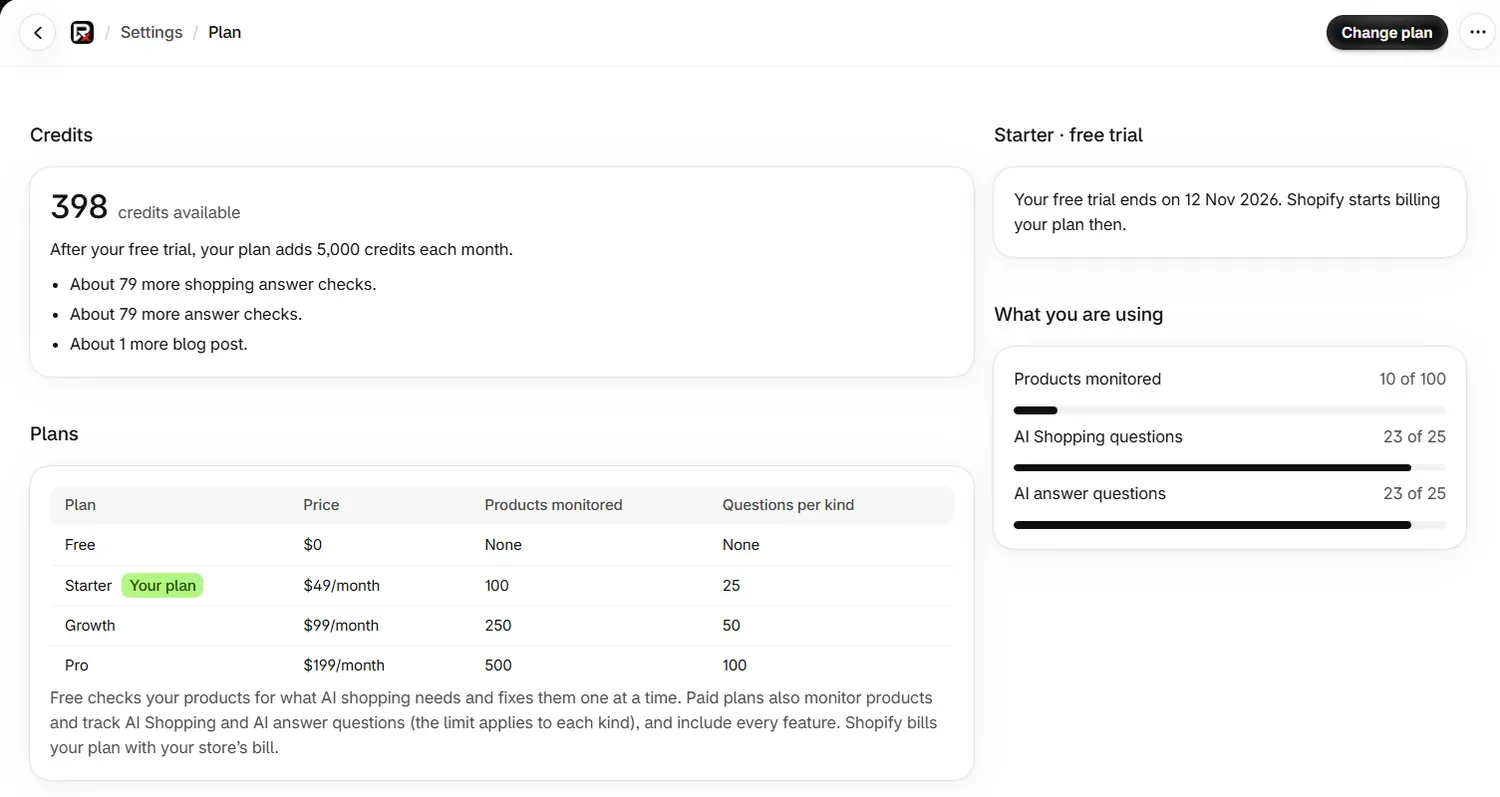
The Plan page has your Credits, the Plans table, a card with your plan's state and date, and What you are using, which shows your questions and products against your limits.
How do I change my plan?
Open Shopify's plan page
On the Plan page, press Change plan, or Choose a plan if you have none. Shopify's plan page opens with Pay monthly and Pay yearly tabs.
Choose the new plan
Press the button on the plan you want. For a paid plan, check Approve charge and press Approve.
Check the Plan page
Home shows Confirming your plan, then your plan. The card on the Plan page shows the state of the change and its date, such as "Changes to Starter on 12 Dec 2026."
What happens when I move up?
Your new limits apply, and RankX AI adds a share of the extra credits for the rest of that month straight away.
What happens when I move down?
The card on the Plan page shows what changes and on what date. Follow that date rather than a general rule, because it reflects your own billing with Shopify.
What if I am over a limit after changing plan?
Nothing is deleted. The app keeps working within the new limit and tells you what it did:
- Questions. "You have 30 questions, and Starter covers 25. We check the oldest 25, and the other 5 wait. Stop some to choose which."
- Products. "The first 100 are monitored, and the other 20 are paused." Paused products stay saved and are not checked. A notification tells you how many.
To choose which ones stay, pause the questions or stop monitoring the products you need least.
How does yearly billing work?
Choose the Pay yearly tab on Shopify's plan page. Shopify bills the year in one charge: $490 for Starter, $990 for Growth or $1,990 for Pro.
Credits still arrive every month, in the same monthly amount as the monthly plan. The Plan page shows the date of your next credits.
How do I cancel?
Open Change plan on the Plan page and press Select on Free. Uninstalling the app also ends your plan in RankX AI, and uninstalling explains what that does to your data.
The card on the Plan page then shows the state of your plan and any date that applies. When a plan has ended, this is what you keep:
- The product check, fixes, bulk fixes, templates, undo and settings stay free.
- Your credit balance shows as paused. Credits are spent only while you are on a paid plan.
- Monitored products, shopper questions and results are kept for 12 months after your trial or plan ends, and Home states this.
What does the plan card mean?
| Card | What it means |
|---|---|
| Start your 7-day free trial | You have not chosen a plan, and your store can have the trial. |
| Choose a plan | You have not chosen a plan, and your store has had its trial. |
| Free plan | You are on Free. |
| Your plan with free trial | Your trial is running. The card shows the date Shopify starts billing. |
| "Your free trial ends on [date] and your plan is cancelled" | The plan will not continue after the trial. Choose a plan to keep it. |
| "Renews on [date]." | Your plan is active. |
| "Changes to [plan] on [date]." | A plan change is booked for that date. |
| "Changes to the Free plan on [date]." | A move to Free is booked for that date. |
| "Your plan ends on [date]." | Your plan is set to end on that date. |
| Your plan is on hold | Shopify has paused your plan because of a billing issue. |
| No plan | Your trial or plan has ended, or the app was uninstalled. Choose a plan to start checking again. |
When something needs a plan, its button is disabled and a line under it says why, such as "You're on the Free plan. This is included in every paid plan. Available on Starter."
Who do I ask about a charge or a refund?
Billing for the app is Shopify's. RankX AI receives your plan and its status, and never your payment details. To see or query a charge, including a refund, start from Settings, then Billing, in your Shopify admin.
Common problems
| What you see | Cause | Fix |
|---|---|---|
| "Shopify has paused your plan because of a billing issue." | Shopify has a billing issue on your store. | Resolve it in your Shopify admin. Checks and fixes start again afterwards. |
| "Shopify is still confirming your plan." | Shopify has not yet told the app about your choice. | Reload in a minute. |
| "We could not read your plan just now." | A brief read problem. | Press Try again, or use Open your plan page. |
| "You are using all 25 questions on Starter. Growth allows 50 questions." | You have reached your limit. | Pause a question or change plan. |
| "Your trial or plan has ended. Choose a plan to use this again." | There is no active plan. | Press Choose a plan. Product fixes and settings stay free. |
What to do next
- See what uses credits.
- Change how often questions are checked.
- Read about uninstalling.
Questions
Who bills me for RankX AI?
Shopify does. Your plan appears on your store's Shopify bill, and RankX AI receives your plan and its status, never your payment details.
How do I change my RankX AI plan?
Go to Settings, press See plans and credits, then press Change plan. Shopify's plan page opens, and your new plan shows in the app once you approve it.
Do yearly plans get all their credits at once?
No. A yearly plan adds its monthly credits every month, so Starter adds 5,000 a month on either billing period.
What happens to my products if I move to a smaller plan?
Nothing is deleted. Products over the new limit are paused and stay saved, and questions over the limit wait. You choose which to stop.
Who do I ask about a charge or a refund?
Billing for the app is Shopify's, so start from Settings, then Billing, in your Shopify admin.
Last updated