Search visibility and sales channels
Why a product can be hidden from search and AI shopping, and how to fix drafts, hidden and unpublished products.
A product can be kept out of search and AI shopping by one setting, whatever else it has. The setting may be on the product, such as being hidden or unpublished, or on your store, such as a password. RankX AI finds each one, fixes what it can in the app, and takes you to the right place in Shopify for the rest.
Before you start
- Every plan, including Free. These fixes use no credits.
- Your store needs a finished product check, so the issues are listed.
What can stop a product being shown?
| What stops it | What it affects | Where you fix it |
|---|---|---|
| Hidden from search engines and AI shopping | Search engines and every AI shopping channel | Here: Show to search engines |
| Unlisted | Search, every AI shopping channel and your own store search | In Shopify: set the product to Active |
| Not published to your online store | ChatGPT. For Google the result is We can't tell, because it may have no page to read | In Shopify: publish to the Online Store sales channel |
| Store password | Every product on every channel | In Shopify: Online Store › Preferences |
| Draft or archived status | Everything. These are listed under Not in the check | In Shopify: set the product to Active |
| Out of stock in every option | Shopify leaves it out of what it offers to assistants. Listed under Not in the check | Restock it, or allow overselling if you can still fulfil orders |
If your store has another storefront, such as a Hydrogen or Headless channel, a product that is off the Online Store shows We can't tell for ChatGPT as well, because it may be sold through that storefront.
How do I fix a hidden product?
Shopify hides a product from search engines through a setting stored on the product, the seo.hidden metafield. Shopify's product page has no switch for it, so the app is where you change it.
Open the issue
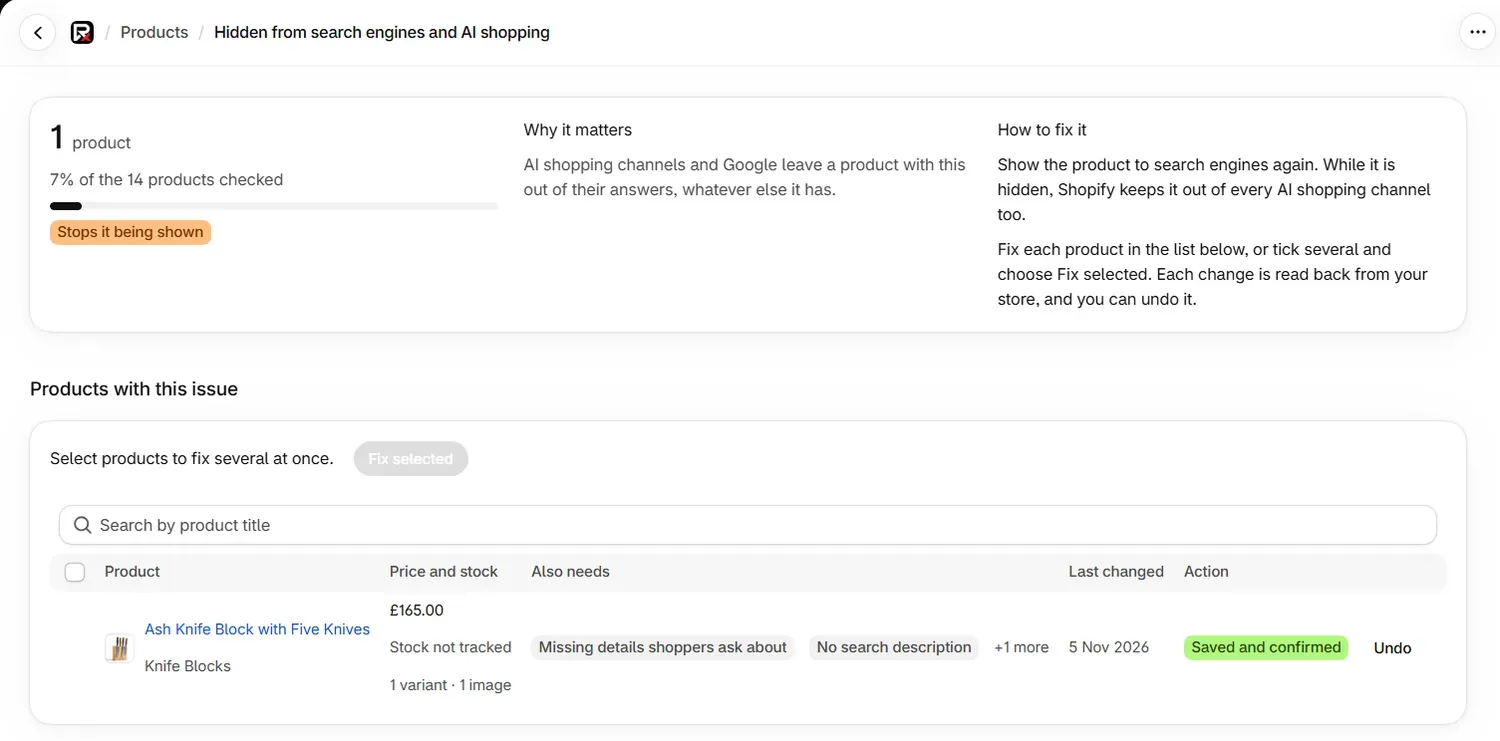
Go to Products, then select Fix products beside Hidden from search engines and AI shopping.
Show the product
Select Show to search engines on the product. For several products, tick them and select Fix selected.
How do I fix an unlisted or unpublished product?
You make status and publishing changes in Shopify, and the app opens the product for you.
Open the product in Shopify
Go to Products, select View products beside the issue, then select Edit product. The product opens in a new tab.
Make the change
For Unlisted, set the status to Active. For Not published to your online store, include it in the Online Store sales channel. Save the product.
Come back to the app
If you started from the product's page in the app, it updates by itself when you return. Saving a product in Shopify also starts a new check, at most once an hour.
For many unpublished products at once, select Open Products on the issue page. In Shopify's products list, tick them and use its bulk actions to include them in Online Store.
What does a store password do?
A store password blocks every product on every AI shopping channel, because nothing can read a store from outside. It is a store setting, so it never appears as an issue on a product. It appears on Products under Fix your store settings first, and Open Online Store › Preferences takes you to the setting.
While the password is on, the three counts show what is ready on the products themselves. Ready to be shown then says nothing on the products stops them, and they can be shown once your store settings are fixed.
What does the AI shopping card on a product mean?
Open a product to see the AI shopping card, with one line for each channel.
| Status | What it means |
|---|---|
| Can be shown | Nothing the check can see stops this channel showing the product. |
| Can't be shown | Something on the product stops it, with the reason beside it, such as "It has no image". |
| We can't tell | A detail could not be read, or the answer depends on something the app cannot see. |
| Stopped by your store settings | The product is fine, and a store setting such as the password stops it. |
| Not assessed | The product was not in your latest product check. A draft, an archived product or one created since the last check is not in it. |
Common problems
| What you see | Cause | What to do |
|---|---|---|
| A product you published in Shopify still shows as not published | The next check has not run yet. | Wait for it, or select Check again on Products. |
| A draft has no issues listed | The check reads active and unlisted products. | Look under Not in the check. Once it is Active, the next check reads it. |
| We can't tell for Google on an unpublished product | Google may have no page to read. | Publish the product to the Online Store. |
| A product is Ready to be shown but does not appear in AI answers | Ready means nothing stops it. The assistant still chooses what to show. | Check your AI search results. |
| "We can't see whether AI channels are switched on" | No app can read this setting. | Check it yourself under Sales channels › Agentic. |
What to do next
Questions
How do I show a hidden product to search engines again?
Go to Products, select Fix products beside Hidden from search engines and AI shopping, then select Show to search engines. You can fix several at once, and you can undo it.
Can RankX AI publish a product or change its status?
You make status and publishing changes in Shopify. Edit product opens the product in a new tab, and the app reads the change when you come back.
Does a store password stop AI shopping?
Yes. No AI shopping assistant can show your products until you remove the password under Online Store › Preferences.
Last updated