Barcodes (GTIN, UPC, EAN, ISBN)
Add valid barcodes, understand each refusal, and mark products that have no barcode.
A barcode, also called a GTIN, is the number printed on a product or its packaging: UPC, EAN or ISBN. The product check finds variants with no barcode, an invalid one or one that is shared. RankX AI checks every barcode you type before it saves, and a product that has no barcode can be marked as such.
Before you start
- Every plan, including Free. Barcodes use no credits.
- Have the barcode to hand. It comes from the product or its packaging, and each product and variant has its own.
- Barcodes are fixed one product at a time, because each one is unique to a single product or variant.
Which barcode formats are accepted?
| Format | Length | Last character |
|---|---|---|
| EAN-8 or UPC-E | 8 digits | Check digit |
| UPC-A | 12 digits | Check digit |
| EAN-13 or ISBN-13 | 13 digits | Check digit |
| GTIN-14 | 14 digits | Check digit |
| ISBN-10 | 10 characters | Check digit, or the letter X |
Spaces and hyphens are removed before the check, so 978-0-14-103614-4 and 9780141036144 are the same barcode.
What is a check digit?
A check digit is the last digit of a barcode, worked out from the digits before it. Each earlier digit goes into a simple sum, and the last digit is whatever makes that sum come out right. Mistype any one digit and the sum no longer works.
RankX AI repeats that sum before saving. That is how it can tell a mistyped barcode from a real one without looking it up.
An ISBN-10 uses a slightly different sum, and its last character can be X, which stands for 10.
Which barcode issues does the check find?
| Issue | What it means |
|---|---|
| No barcode | A variant has no barcode. |
| Barcode is not valid | A variant has barcodes, and none of them is valid. |
| Same barcode on more than one item | A valid barcode is on several variants or products. Leading zeros are ignored when comparing. Check each one against the product or its packaging, and correct the ones that were copied. |
| Some barcodes not checked | The product has more variants than could be read, and nothing is wrong among those read. Open its variants to check them, and they are checked again with your products. This is not counted as missing. |
A few rules decide which issue you see:
- A variant passes if at least one of its barcodes is valid.
- If any variant has no barcode, the product shows No barcode rather than Barcode is not valid. The invalid barcode appears once nothing is missing, or once the product is marked as having no barcode.
How do I add or correct a barcode?
Open the issue
Go to Products, then select Fix products beside the barcode issue.
Open the barcode dialog
Select Add barcode on the product. The dialog has one field per variant. You can also open a product and select Add barcode under What to fix, or Manage barcodes on its Variants card.
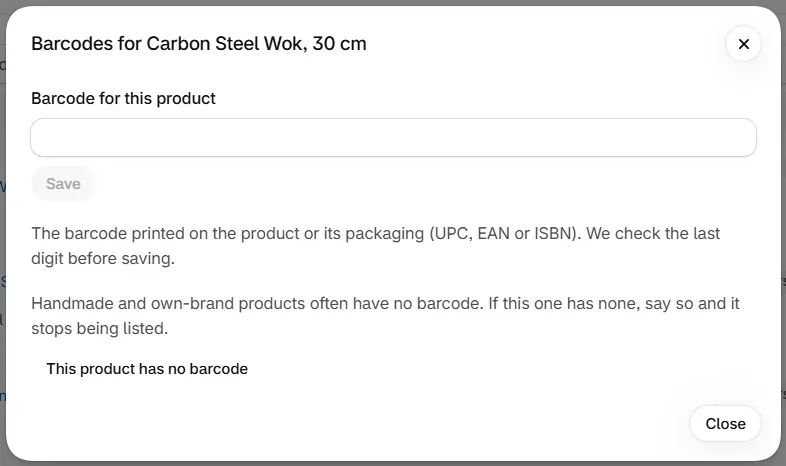
Type the barcode and save
Copy the barcode from the product or its packaging, then select Save beside that field. Each variant saves on its own.
Check the result
If the barcode passes, the row shows Saved and confirmed with Undo. If it does not, a Not changed banner explains why and nothing is written.
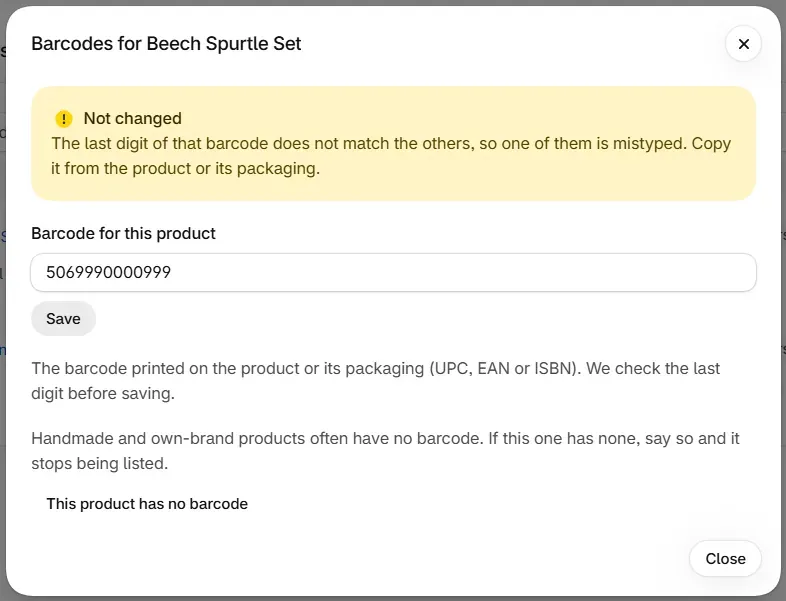
A variant can hold several barcodes. The app replaces the first and keeps the others.
Why was my barcode refused?
Every refusal appears in a Not changed banner inside the dialog, and nothing is written to your store.
| Message | Cause | What to do |
|---|---|---|
| "That is not a barcode we recognise. A UPC, EAN or ISBN has 8, 10, 12, 13 or 14 characters." | The length or the characters do not fit any format. | Copy it again from the product or its packaging. |
| "The last digit of that barcode does not match the others, so one of them is mistyped." | The check digit does not fit. | Compare each digit with the packaging. |
| "That looks like a filler number, not a real barcode." | It is one repeated digit, or a run of six or more digits going up or down, such as 123456789012. These are refused even if the last digit would pass. | Use the barcode printed on the product. If there is none, mark the product. |
What about products that have no barcode?
Handmade and own-brand products often have no barcode, and that is fine. Mark them so they stop being listed. Do not make a number up. Gift cards are exempt and need no mark.
Open the barcode dialog
Select Add barcode on the issue page, or Manage barcodes on the product's page.
Mark the product
Select This product has no barcode. A message confirms Marked as having no barcode, and the dialog offers Remove the mark.
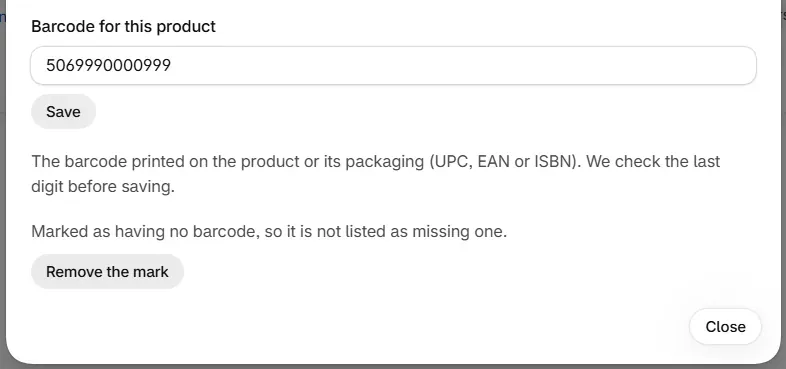
The mark is free. It is stored in RankX AI and changes nothing on your store. The issue clears from your latest check at once, and the totals on Products follow at the next check.
The mark covers No barcode only. If the product holds a wrong barcode, it is still reported, so correct it or take it off in Shopify.
To reverse the mark, open the same dialog and select Remove the mark.
Can I undo a barcode change?
Yes. Select Undo on the row, or go to Settings, then Changes. The earlier barcode comes back, or the field goes back to empty if it had none. Undo changes has the details.
Common problems
| What you see | Cause | What to do |
|---|---|---|
| A product still shows No barcode after you added one | Another variant has none. | Open the dialog and fill in each variant. |
| Barcode is not valid appears after you marked a product | The mark hides No barcode, so the invalid barcode on another variant now shows. | Correct that barcode. |
| A note saying the dialog is "Showing the first" of your variants | The product has more variants than the dialog lists. | Set the others on the product's page in Shopify. |
| Same barcode on more than one item on variants of one product | A barcode was copied across variants. | Give each variant the barcode on its own packaging. |
| The issue count has not gone down | Counts on Products change at the next check. | Wait for the next check, or select Check again. |
What to do next
Questions
Can I fix barcodes in bulk?
Barcodes are fixed one product at a time, because each barcode is unique to one product or variant. Categories, details and search visibility can be fixed in bulk.
My product is handmade and has no barcode. What do I do?
Open its barcode dialog and select This product has no barcode. The product stops being listed as missing one. This is free, and it changes nothing on your store.
Why was my barcode refused?
It is the wrong length, its last digit does not match the others, or it looks like a filler number such as 123456789012. Nothing is written. Copy the barcode from the product or its packaging.
Do gift cards need a barcode?
No. Gift cards are exempt from the barcode check.
Last updated